
Aiseesoft iPhone to Mac Transfer
Version 6.2.20
Shareware
$19.00
0 downloads
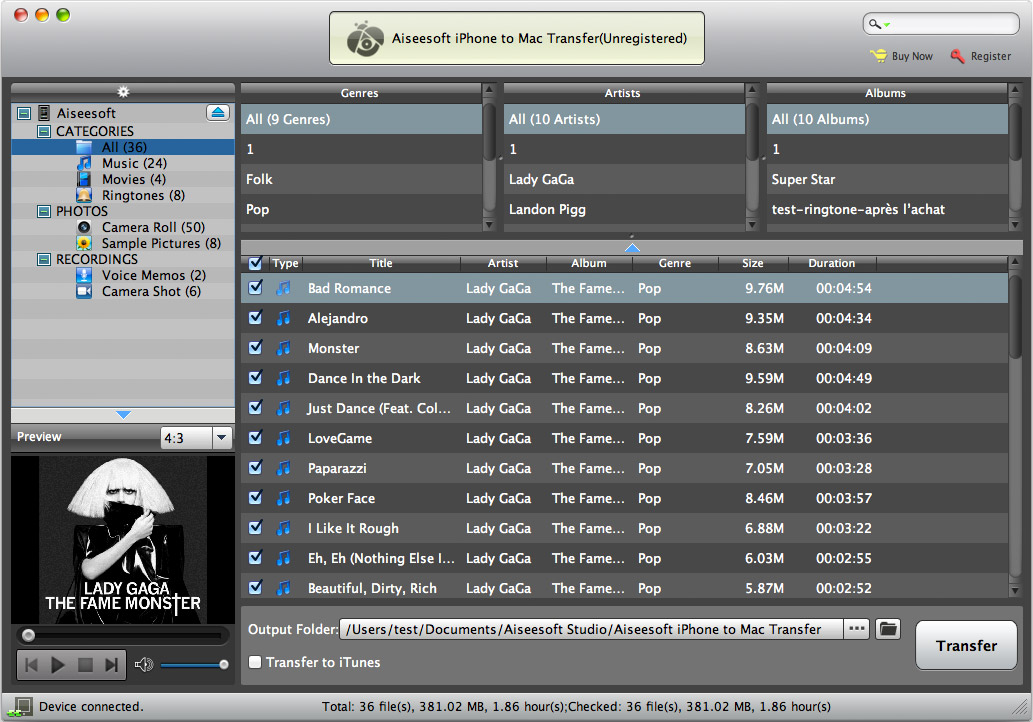
Aiseesoft iPhone to Mac Transfer is specially designed
for iPhone users to export iPhone music, movies,
ringtones, camera roll, and pictures to Mac without
losing anything. Also it allows you to backup iPhone
files to iTunes, create, delete and edit
iPhone/iPad/iPod playlist and its contents. What's
more, it is highly compatible with The New iPad,
iPhone 5 and iOS 6 after upgraded.
Key Functions:
1. Transfer videos/audios/pictures from iPhone to Mac
Aiseesoft iPhone to Mac Transfer can easily transfer
files (music, movies, ringtones, camera roll, and
pictures) from iPhone to Mac local disk for backup.
2. Backup iPhone files to iTunes
With this Aiseesoft iPhone to Mac Transfer, you are
allowed to copy iPhone files to iTunes directly.
3. Manage iPad/iPod/iPhone playlist
You can create, delete and edit the playlist and its
contents.
4. Recognize iPhone automatically
Once connecting iPhone with your Mac, this iPhone to
Mac Transfer can automatically identify the property
of your devices: type, capacity (used and available
space), version, serial number, and format.
5. Auto scan
Aiseesoft iPhone to Mac Transfer can easily help find
the files you want to transfer by by
Name/Album/Artist/Genre.
6. Automatically count files
Counting your selected files (succeed or failed
transferred files) automatically is supported by this
iPhone Mac Transfer.
for iPhone users to export iPhone music, movies,
ringtones, camera roll, and pictures to Mac without
losing anything. Also it allows you to backup iPhone
files to iTunes, create, delete and edit
iPhone/iPad/iPod playlist and its contents. What's
more, it is highly compatible with The New iPad,
iPhone 5 and iOS 6 after upgraded.
Key Functions:
1. Transfer videos/audios/pictures from iPhone to Mac
Aiseesoft iPhone to Mac Transfer can easily transfer
files (music, movies, ringtones, camera roll, and
pictures) from iPhone to Mac local disk for backup.
2. Backup iPhone files to iTunes
With this Aiseesoft iPhone to Mac Transfer, you are
allowed to copy iPhone files to iTunes directly.
3. Manage iPad/iPod/iPhone playlist
You can create, delete and edit the playlist and its
contents.
4. Recognize iPhone automatically
Once connecting iPhone with your Mac, this iPhone to
Mac Transfer can automatically identify the property
of your devices: type, capacity (used and available
space), version, serial number, and format.
5. Auto scan
Aiseesoft iPhone to Mac Transfer can easily help find
the files you want to transfer by by
Name/Album/Artist/Genre.
6. Automatically count files
Counting your selected files (succeed or failed
transferred files) automatically is supported by this
iPhone Mac Transfer.
Program details
Publisher
Aiseesoft StudioE-mail
Contact the publisherPlatforms
Macintosh 68kFile size
36147 KBFile date
4/1/2013License
SharewareExpires on
7/31/2013Expires after
99 daysExpiration info
The maximum transfer of 10 files for trial version.Installation
Install & UninstallRecord updated
4/2/2013

