
AnyMP4 iPad Converter for Mac
Version 6.1.30
Shareware
$35.00
2 downloads
AnyMP4 iPad Converter for Mac is the professional
software for Mac users. This wonderful software enables
you to convert both DVD and almost all the videos to
iPad compatible video formats. And this program has
very fast converting speed and rather high output quality.
Besides, this software also provides you with some
editing functions to customize the video effect. If you
are not satisfied with the current video, you can do
some changes for it such as trimming the video length,
croping the video frame, merging video clips together,
adding watermark to the video and adjusting output
parameters.
Key functions:
1.Convert DVD/video to iPad compatible formats
AnyMP4 iPad Converter for Mac can not only help you
convert any DVD disc to iPad compatible video format,
but also convert various popular video files to iPad
MP4, MOV, M4V and more. Besides, this iPad Converter
for Mac can help you choose your liked audio
track/subtitle for the video if some video files contain.
2.Edit the video on your Mac
With this wonderful software, you can customize the
video effect according to your needs, you can use the
"Trim" function to trim your wanted length by setting
the start time and the end time, and crop the video
frame to remove the black edges for your needs. Also,
you can add text or picture watermark to the video, and
the brightness, saturation, contrast, hue and volume
are all available for you to adjust.
3.Convenient to use
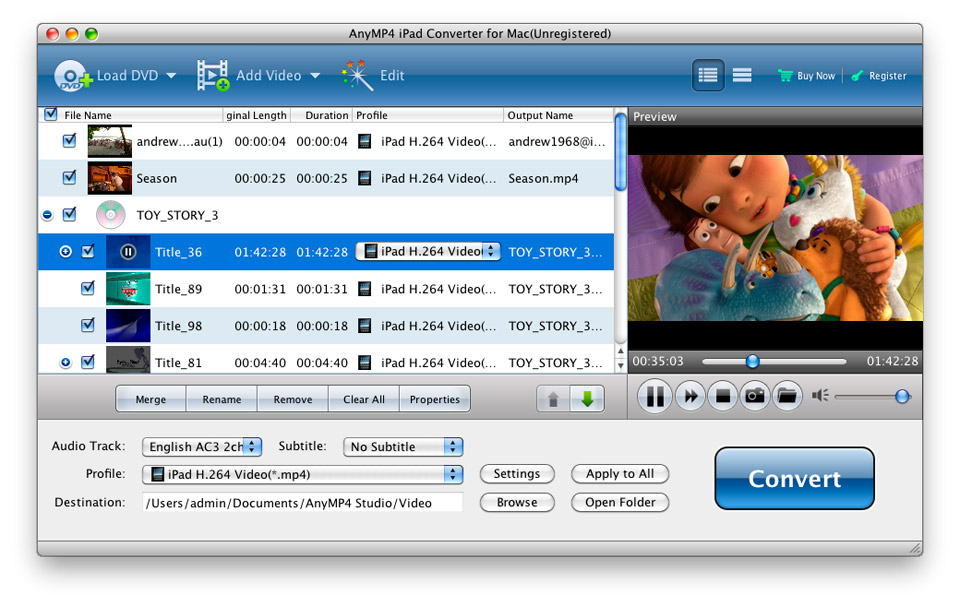
This software has a very clear interface, which can
help you use it conveniently, and you can preview the
video effect easily no matter which step you reach, and
you can also take a snapshot and save it to your
pointed directory.
software for Mac users. This wonderful software enables
you to convert both DVD and almost all the videos to
iPad compatible video formats. And this program has
very fast converting speed and rather high output quality.
Besides, this software also provides you with some
editing functions to customize the video effect. If you
are not satisfied with the current video, you can do
some changes for it such as trimming the video length,
croping the video frame, merging video clips together,
adding watermark to the video and adjusting output
parameters.
Key functions:
1.Convert DVD/video to iPad compatible formats
AnyMP4 iPad Converter for Mac can not only help you
convert any DVD disc to iPad compatible video format,
but also convert various popular video files to iPad
MP4, MOV, M4V and more. Besides, this iPad Converter
for Mac can help you choose your liked audio
track/subtitle for the video if some video files contain.
2.Edit the video on your Mac
With this wonderful software, you can customize the
video effect according to your needs, you can use the
"Trim" function to trim your wanted length by setting
the start time and the end time, and crop the video
frame to remove the black edges for your needs. Also,
you can add text or picture watermark to the video, and
the brightness, saturation, contrast, hue and volume
are all available for you to adjust.
3.Convenient to use
This software has a very clear interface, which can
help you use it conveniently, and you can preview the
video effect easily no matter which step you reach, and
you can also take a snapshot and save it to your
pointed directory.
Program details
Publisher
AnyMP4 StudioE-mail
Contact the publisherPlatforms
Macintosh 68k<br>Macintosh PPCFile size
26419 KBFile date
6/8/2013License
SharewareExpires on
9/30/2013Expires after
99 daysExpiration info
Trial version can convert files for 5 minutes.Installation
Install & UninstallRecord updated
6/9/2013