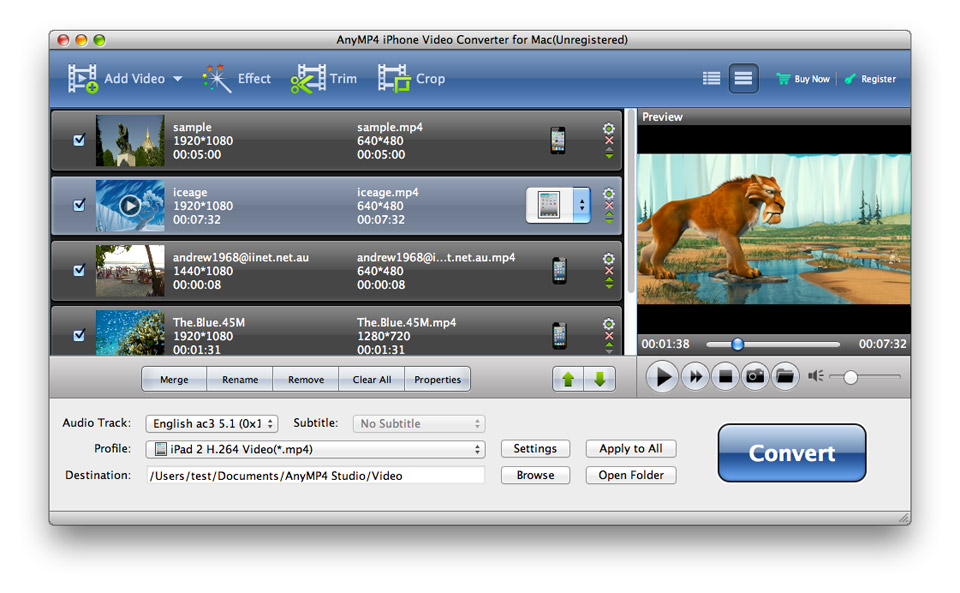

AnyMP4 iPhone Video Converter for Mac
Version 6.1.38
Shareware
$29.00
2 downloads
AnyMP4 iPhone Video Converter for Mac can convert any
popular video to iPhone compatible video and audio
format. And you can also use it to extract audio files
from videos and then convert them to iPhone supported
audio formats like MP3, AAC, WAV and more. Now it
upgrades to support the input files like OGM, WTV,
DVR-MS, Bink video, M4B, AUD, MKA, AIFC, CAF, MPC, QCP
and the output audio format - ALAC. Besides, it
possesses some powerful video/audio editing functions
for you to choose.
Key features:
1.Convert video to iPhone
AnyMP4 iPhone Video Converter for Mac can help you
convert many popular video files to iPhone compatible
video and audio formats, such as MP4, MOV, M4V, H.264,
MPEG-4, AAC, AIFF, ALAC, MP3, M4A, WAV and so on. Also,
with it you can extract audio files from the videos and
then convert them to iPhone compatible audio formats.
2.Edit the video effect
With AnyMP4 iPhone Video Converter for Mac, you can cut
off any part of the video from the whole movie by
setting the start time and the end time, cut off the
black edges of source video to get the better play
effect, add text or picture watermark to personalize
the output video and merge several video clips together
and output them as a single file for enjoyment.
3.Set output parameter
You can also adjust the profile as you like by setting
the output parameters such as Video Resolution,
Bitrate, Encoder, Frame Rate, Aspect Ratio, Audio
Encoder, Channels, Bitrate and Sample Rate. Besides,
you can adjust the video effect by adjusting Video
Brightness, Saturation, Contrast, Hue and Volume.
popular video to iPhone compatible video and audio
format. And you can also use it to extract audio files
from videos and then convert them to iPhone supported
audio formats like MP3, AAC, WAV and more. Now it
upgrades to support the input files like OGM, WTV,
DVR-MS, Bink video, M4B, AUD, MKA, AIFC, CAF, MPC, QCP
and the output audio format - ALAC. Besides, it
possesses some powerful video/audio editing functions
for you to choose.
Key features:
1.Convert video to iPhone
AnyMP4 iPhone Video Converter for Mac can help you
convert many popular video files to iPhone compatible
video and audio formats, such as MP4, MOV, M4V, H.264,
MPEG-4, AAC, AIFF, ALAC, MP3, M4A, WAV and so on. Also,
with it you can extract audio files from the videos and
then convert them to iPhone compatible audio formats.
2.Edit the video effect
With AnyMP4 iPhone Video Converter for Mac, you can cut
off any part of the video from the whole movie by
setting the start time and the end time, cut off the
black edges of source video to get the better play
effect, add text or picture watermark to personalize
the output video and merge several video clips together
and output them as a single file for enjoyment.
3.Set output parameter
You can also adjust the profile as you like by setting
the output parameters such as Video Resolution,
Bitrate, Encoder, Frame Rate, Aspect Ratio, Audio
Encoder, Channels, Bitrate and Sample Rate. Besides,
you can adjust the video effect by adjusting Video
Brightness, Saturation, Contrast, Hue and Volume.
Program details
Publisher
AnyMP4 StudioE-mail
Contact the publisherPlatforms
Macintosh 68k<br>Macintosh PPCFile size
26316 KBFile date
6/12/2013License
SharewareExpires on
9/30/2013Expires after
99 daysExpiration info
Trial version can convert files for 5 minutes.Installation
Install & UninstallRecord updated
6/13/2013