
LANVisor
Version 1.9.8.0
Commercial Demo
$69.00
0 downloads
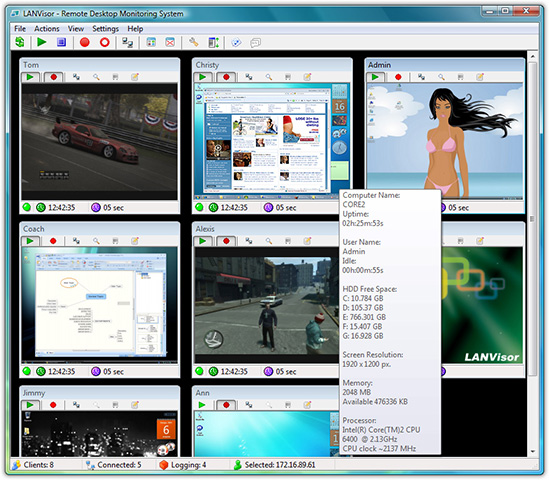
Introducing LANVisor - the system for viewing the screens of remote computers.
The program is to be used on the Local Area Network and is used to monitor and record user activity. The LANVisor system is compatible with remote control software, which allows you to control the mouse and keyboard of a computer connected to the network.
At the office, this system will help a manager catch employees suspected of violating the daily routine and thus improve productivity.
In a computer class, this system will help the teacher keep an eye on the flow and completeness of students' tasks. The teacher can see what students do on their computers when the teacher was out of the class.
At an Internet-Cafe or in a computer-game room, the system will help the administrator see the overall picture of what the users are doing, and help them if necessary, without leaving the work place. It will let you see some system performance information on remote computers.
The Server's basic features:
- Ordered listing of remote computer screenshots
- Flexible configuration of screenshot size and display order
- Ordered screenshot logging for all or individual clients
- Compatibility with remote control software for managing the mouse and keyboard on the remote computer
- Displaying actual-sized screenshots in a separate window with advanced functions
- Sending text messages
- Viewing screenshots as a slide show
- Displaying information on available hard disk space on a remote computer, and other information about system resources
- Controlling the overall volume level of the audio device on remote computers
- Remote power management
- Password-restricted access
The Client's basic features:
- Launch automatically on system startup
- The program start is invisible to users
- Keyboard shortcuts for accessing the program settings
- Password-restricted access to the program settings
- Adjustable screenshot quality
- User-defined screenshot capture period.
The program is to be used on the Local Area Network and is used to monitor and record user activity. The LANVisor system is compatible with remote control software, which allows you to control the mouse and keyboard of a computer connected to the network.
At the office, this system will help a manager catch employees suspected of violating the daily routine and thus improve productivity.
In a computer class, this system will help the teacher keep an eye on the flow and completeness of students' tasks. The teacher can see what students do on their computers when the teacher was out of the class.
At an Internet-Cafe or in a computer-game room, the system will help the administrator see the overall picture of what the users are doing, and help them if necessary, without leaving the work place. It will let you see some system performance information on remote computers.
The Server's basic features:
- Ordered listing of remote computer screenshots
- Flexible configuration of screenshot size and display order
- Ordered screenshot logging for all or individual clients
- Compatibility with remote control software for managing the mouse and keyboard on the remote computer
- Displaying actual-sized screenshots in a separate window with advanced functions
- Sending text messages
- Viewing screenshots as a slide show
- Displaying information on available hard disk space on a remote computer, and other information about system resources
- Controlling the overall volume level of the audio device on remote computers
- Remote power management
- Password-restricted access
The Client's basic features:
- Launch automatically on system startup
- The program start is invisible to users
- Keyboard shortcuts for accessing the program settings
- Password-restricted access to the program settings
- Adjustable screenshot quality
- User-defined screenshot capture period.
Program details
Publisher
LANVisor.comE-mail
Contact the publisherHome page
http://www.lanvisor.com/Platforms
WinVista,Windows XP,Win7 x32,Win7 x64,Win8 x32,Win8 x64,WinServerFile size
6259 KBFile date
6/9/2014License
Commercial DemoInstallation
Install & UninstallRecord updated
7/1/2015