
PDF2Printer for Windows 10
Version 1.02
Freeware
Free
0 downloads
By default Windows 10 does not have the ability to
print PDF files to printer in batch. PDF2Printer
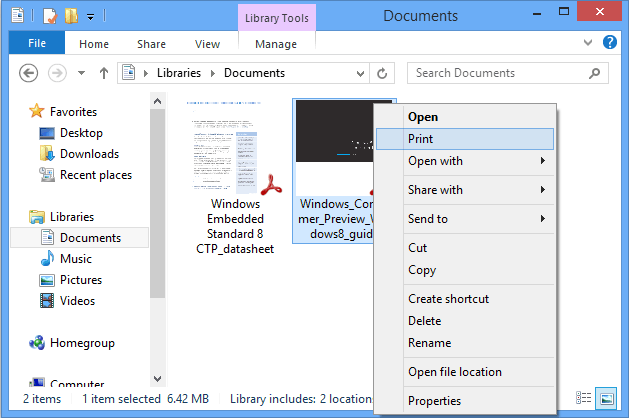
allows to print PDF to a printer from any Windows
application or anywhere in Windows Explorer you right-
click on a PDF document and choose Print.
A batch printing tool for PDF files is included in the
setup package. Once installed, you get the PDF2Printer
Batch Print tool, you can automate your print process
by adding files or adding all files in a specific
folder to a a task list and printing them to a printer
of your choice. You are allowed to specify the maximum
number of PDF documents in your print queue to avoid
performance degradation in the automation process.
Major Features:
Print to a specified printer
You can print to a specific printer, system default
printer, or choose to select a printer in the print
dialog at runtime.
Smart Rotation
Automatic rotation of PDF pages is featured. You can
disable the rotation at any time you want.
Smart Scaling
Shrink large pages and expand small pages to fit on
medium.
Flexible Configuration
Configure the available settings with the PDF2Printer
Configuration Manager.
Batch PDF Printing
Print PDF to your printer in batch with the
PDF2Printer Batch Print tool.
Command-line Operability
Control the print process with command line switches.
PDF2Printer command-line version is also available
upon your request.
64-bit optimization
On Windows 10 64-bit operating system, PDF2Printer
prints PDF to printer as twice as much faster than on
32-bit.
The free program supports Microsoft Windows 10 64-bit
and 32-bit, and is backward compatible with Microsoft
Windows 8.1, Windows 8, Windows 7, Windows Vista,
Windows XP, Windows Server 2008, Window Server 2003,
and supports Windows Server 2012.
print PDF files to printer in batch. PDF2Printer
allows to print PDF to a printer from any Windows
application or anywhere in Windows Explorer you right-
click on a PDF document and choose Print.
A batch printing tool for PDF files is included in the
setup package. Once installed, you get the PDF2Printer
Batch Print tool, you can automate your print process
by adding files or adding all files in a specific
folder to a a task list and printing them to a printer
of your choice. You are allowed to specify the maximum
number of PDF documents in your print queue to avoid
performance degradation in the automation process.
Major Features:
Print to a specified printer
You can print to a specific printer, system default
printer, or choose to select a printer in the print
dialog at runtime.
Smart Rotation
Automatic rotation of PDF pages is featured. You can
disable the rotation at any time you want.
Smart Scaling
Shrink large pages and expand small pages to fit on
medium.
Flexible Configuration
Configure the available settings with the PDF2Printer
Configuration Manager.
Batch PDF Printing
Print PDF to your printer in batch with the
PDF2Printer Batch Print tool.
Command-line Operability
Control the print process with command line switches.
PDF2Printer command-line version is also available
upon your request.
64-bit optimization
On Windows 10 64-bit operating system, PDF2Printer
prints PDF to printer as twice as much faster than on
32-bit.
The free program supports Microsoft Windows 10 64-bit
and 32-bit, and is backward compatible with Microsoft
Windows 8.1, Windows 8, Windows 7, Windows Vista,
Windows XP, Windows Server 2008, Window Server 2003,
and supports Windows Server 2012.
Program details
Publisher
Alicia MartinezE-mail
Contact the publisherPlatforms
Win7 x32<br>Win7 x64<br>Win8 x32<br>Win8 x64<br>WinServer<br>Windows XPFile size
6774 KBFile date
2/1/2015License
FreewareInstallation
Install & UninstallRecord updated
2/7/2015