
SterJo Task Manager
Version 2.7
Freeware
Free
0 downloads
How many times does your computer slow you down in the middle of important work because of too many open and running apps, services and etc?
It’s very annoying and disturbing, we all know.
We can give you an insight in one of the simplest and easy-to-handle gadgets you could find, and it’s FREE.
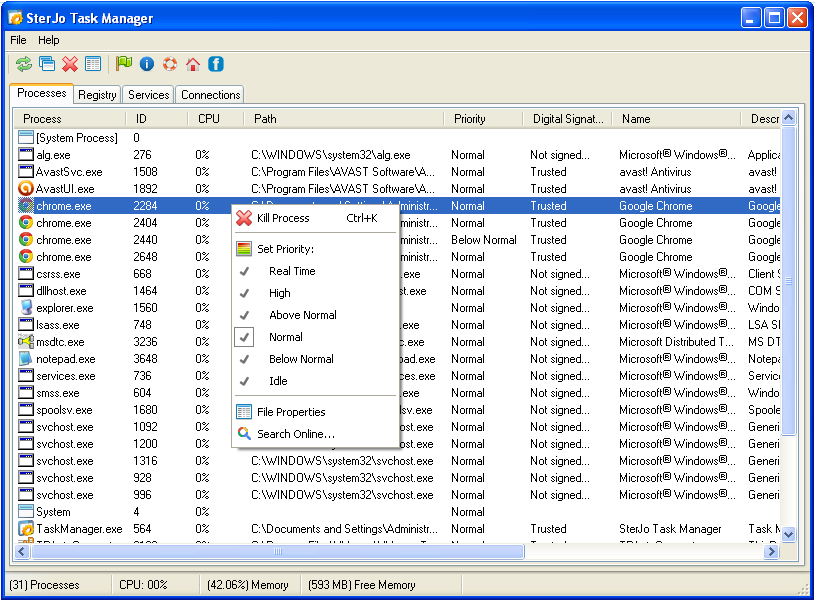
SterJo Task Manager software is designed to manage all the running processes, services, total processes that use Internet, and registry programs. You can kill or terminate any running process or can set its priority high, low, medium, etc. This helps to manage CPU usage. Using this task manager software, you can also speed up Windows startup by excluding or removing unwanted programs from registry.
It allows you to take full control and manage:
• Processes. This tab provides all the system processes, their priority, CPU usage, path, description, and digital signature.
• Registry. View and manage the list of Windows startup programs.
• Services. You will be able to Pause, Resume or Delete the selected service.
• Connections. Application lists down all network connections and their related processes.
It is a good alternative to Windows default task manager, as it performs many tasks. You can view each processes CPU usage separately, can manage startup type (auto, manual, or disable) of services, and can close any unnecessary established connections.
Some of the advantages of this fine piece of software are:
• It’s a quite useful task manager software that can manage all the processes, services, and registry programs.
• It lets you set priority for processes, remove or add a new program to registry startup list, and start/stop any service.
• Provides connections tab that shows all the processes that requires Internet connection. This feature you won’t find in default task manager.
This is by far the best replacement for Windows 7 task manager, it also operates on most of Windows operating systems and many agree it’s the best task manager in general.
It’s very annoying and disturbing, we all know.
We can give you an insight in one of the simplest and easy-to-handle gadgets you could find, and it’s FREE.
SterJo Task Manager software is designed to manage all the running processes, services, total processes that use Internet, and registry programs. You can kill or terminate any running process or can set its priority high, low, medium, etc. This helps to manage CPU usage. Using this task manager software, you can also speed up Windows startup by excluding or removing unwanted programs from registry.
It allows you to take full control and manage:
• Processes. This tab provides all the system processes, their priority, CPU usage, path, description, and digital signature.
• Registry. View and manage the list of Windows startup programs.
• Services. You will be able to Pause, Resume or Delete the selected service.
• Connections. Application lists down all network connections and their related processes.
It is a good alternative to Windows default task manager, as it performs many tasks. You can view each processes CPU usage separately, can manage startup type (auto, manual, or disable) of services, and can close any unnecessary established connections.
Some of the advantages of this fine piece of software are:
• It’s a quite useful task manager software that can manage all the processes, services, and registry programs.
• It lets you set priority for processes, remove or add a new program to registry startup list, and start/stop any service.
• Provides connections tab that shows all the processes that requires Internet connection. This feature you won’t find in default task manager.
This is by far the best replacement for Windows 7 task manager, it also operates on most of Windows operating systems and many agree it’s the best task manager in general.
Program details
Publisher
SterJo SoftwareE-mail
Contact the publisherHome page
http://www.sterjosoft.com/Platforms
WinVista,WinVista x64,Windows XP,Win7 x32,Win7 x64,Win8 x32,Win8 x64,WinServerFile size
878 KBFile date
11/16/2013License
FreewareInstallation
Install & UninstallRecord updated
5/25/2015

