
PDF Writer for Windows 10
Version 1.01
Shareware
$69.00
0 downloads
As an alternative to Microsoft virtual PDF printer
namely Print as a PDF, PDF Writer for Windows 10
allows to create high-quality, press-ready, full-
featured, optionally encrypted PDF files on Microsoft
Windows 10 for users who have a need to better their
PDF creation in super compression, password
protection, access restriction, font integration,
document summary, automatic output, document
resolution, page scaling, PDF version options, paper
margin options, and more paper sizes.
PDF Writer for Windows 10 installs itself as a virtual
print driver. After a successful installation, a PDF
Writer printer will appear in your Printers and Faxes
folder just next to Microsoft Print as a PDF printer.
To create PDF files, all you have to do is to print
your documents (from Microsoft Word, Excel,
PowerPoint, Visio, Access, Publisher, Outlook,
WordPad, NotePad or any other software) to this PDF
Writer printer. Open a document, choose Print and
select the PDF Writer printer. Confirm your Print. It
will ask you where to save the PDF file and when
finished, the PDF file will not be automatically
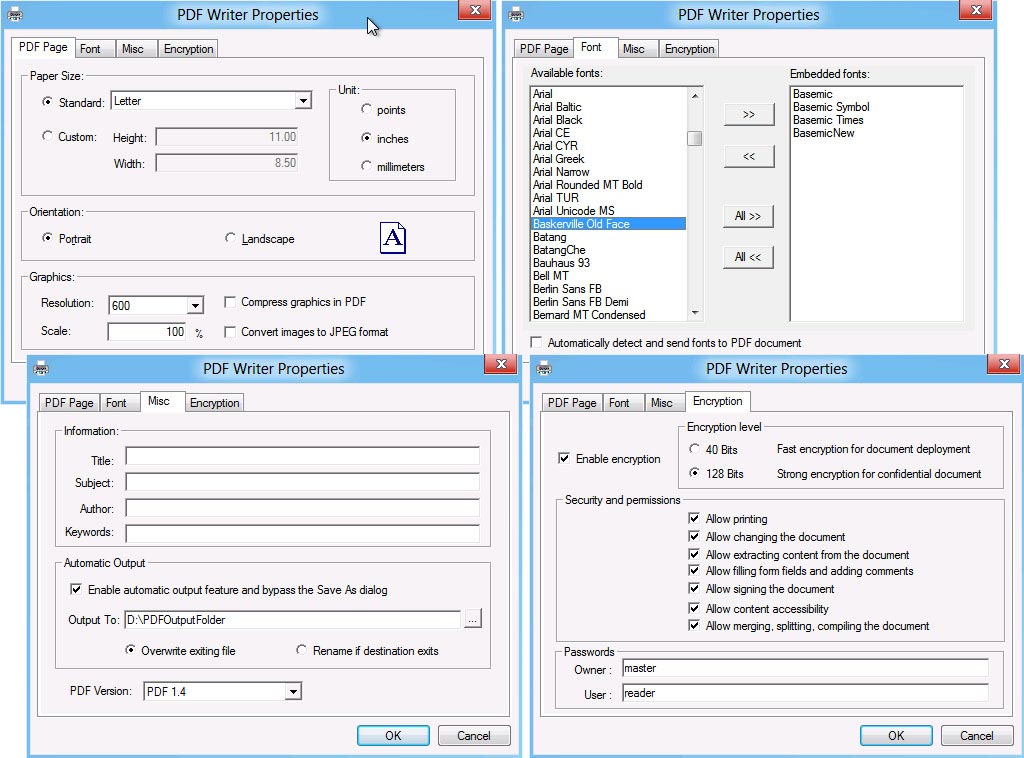
opened. All options for PDF creation are in the
Printing Preferences dialog box of the PDF Writer
printer.
With these options you can choose the paper size or
define your customized paper size, set page
orientation, specify document resolution, embed fonts,
add document property information, secure PDF file
with password, restrict certain permissions, and
automatically output PDF file bypassing the Save As
PDF dialog box.
As a quick solution for creating high-quality, press-
ready, full-featured, more secured PDF documents that
can be e-mailed, published and viewed by any PDF
reader such as Microsoft Windows PDF Reader, Adobe
Reader. A few simple clicks will convert almost any of
your existing documents to a high quality PDF files.
PDF Writer for Windows 10 is backward compatible with
Microsoft Windows 8.1, Windows 8, Windows 7, Windows
Vista, and Windows XP.
namely Print as a PDF, PDF Writer for Windows 10
allows to create high-quality, press-ready, full-
featured, optionally encrypted PDF files on Microsoft
Windows 10 for users who have a need to better their
PDF creation in super compression, password
protection, access restriction, font integration,
document summary, automatic output, document
resolution, page scaling, PDF version options, paper
margin options, and more paper sizes.
PDF Writer for Windows 10 installs itself as a virtual
print driver. After a successful installation, a PDF
Writer printer will appear in your Printers and Faxes
folder just next to Microsoft Print as a PDF printer.
To create PDF files, all you have to do is to print
your documents (from Microsoft Word, Excel,
PowerPoint, Visio, Access, Publisher, Outlook,
WordPad, NotePad or any other software) to this PDF
Writer printer. Open a document, choose Print and
select the PDF Writer printer. Confirm your Print. It
will ask you where to save the PDF file and when
finished, the PDF file will not be automatically
opened. All options for PDF creation are in the
Printing Preferences dialog box of the PDF Writer
printer.
With these options you can choose the paper size or
define your customized paper size, set page
orientation, specify document resolution, embed fonts,
add document property information, secure PDF file
with password, restrict certain permissions, and
automatically output PDF file bypassing the Save As
PDF dialog box.
As a quick solution for creating high-quality, press-
ready, full-featured, more secured PDF documents that
can be e-mailed, published and viewed by any PDF
reader such as Microsoft Windows PDF Reader, Adobe
Reader. A few simple clicks will convert almost any of
your existing documents to a high quality PDF files.
PDF Writer for Windows 10 is backward compatible with
Microsoft Windows 8.1, Windows 8, Windows 7, Windows
Vista, and Windows XP.
Program details
Publisher
Michel DucE-mail
Contact the publisherPlatforms
Win7 x32<br>Win7 x64<br>Win8 x32<br>Win8 x64<br>WinServer<br>Windows XPFile size
1324 KBFile date
10/4/2015License
SharewareInstallation
Install & UninstallRecord updated
5/30/2015