
MSG Viewer Pro
Version 6.0.0.326
Shareware
$69.99
0 downloads
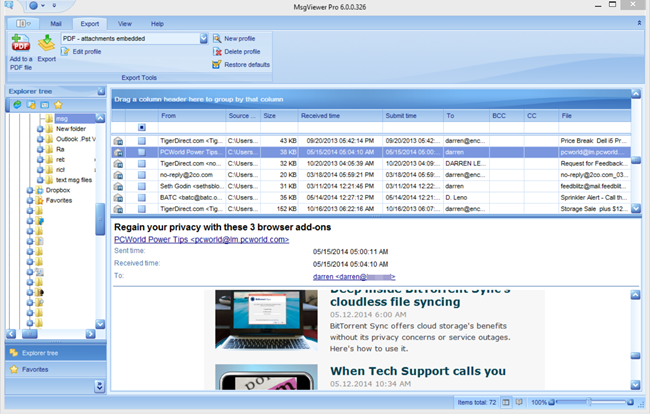
MSGViewer Pro is a powerful viewer and file manager for .msg and .eml email messages. View, search and print email messages without Outlook. Reply to .msg emails or forward using your default email client.
If you have tried other .msg viewers but haven't found one that really works, then MsgViewer Pro is for you. Rendering email messages is difficult because there are so many variations. Since 2006, MsgViewer Pro has set the standard for high quality email rendering.
MsgViewer Pro lets you extract file attachments from the .msg message file. Very simple to use. Can easily be set to be the default handler for .msg or .eml files.
Batch export messages to image formats including .pdf, .gif, tif, .jpg, pif, .bmp or .txt.
Batch rename emails with 'Bates Stamp' naming scheme. Export emails to .csv spreadsheet format.
MsgViewer Pro works well in a shared environment, such as TS or Citrix. Have multiple windows open simultaneously. Command line switches allow you to deactivate features that you do not want users to have access to.
Converting .msg or .eml emails to PDF is important to legal professionals. Use MsgViewer Pro to convert email to a single .pdf, or convert multiple .msg files to individual .pdf files. You can choose whether to convert email fille attachments to the .pdf image, or embed them as files.
Do you have msg or eml files sorted into directories? MsgViewer Pro will search for email files in recursive directories or your entire hard drive.
MsgViewer Pro is used by large corporations and governments, as well as small businesses and individuals.
MsgViewer Pro can also access Outlook .pst files if mapi is present on your computer. If you are moving from Outlook to another email client, MsgViewer Pro can help bridge the gap that your users may experience as they transition to the new client.
Download a trial today!
If you have tried other .msg viewers but haven't found one that really works, then MsgViewer Pro is for you. Rendering email messages is difficult because there are so many variations. Since 2006, MsgViewer Pro has set the standard for high quality email rendering.
MsgViewer Pro lets you extract file attachments from the .msg message file. Very simple to use. Can easily be set to be the default handler for .msg or .eml files.
Batch export messages to image formats including .pdf, .gif, tif, .jpg, pif, .bmp or .txt.
Batch rename emails with 'Bates Stamp' naming scheme. Export emails to .csv spreadsheet format.
MsgViewer Pro works well in a shared environment, such as TS or Citrix. Have multiple windows open simultaneously. Command line switches allow you to deactivate features that you do not want users to have access to.
Converting .msg or .eml emails to PDF is important to legal professionals. Use MsgViewer Pro to convert email to a single .pdf, or convert multiple .msg files to individual .pdf files. You can choose whether to convert email fille attachments to the .pdf image, or embed them as files.
Do you have msg or eml files sorted into directories? MsgViewer Pro will search for email files in recursive directories or your entire hard drive.
MsgViewer Pro is used by large corporations and governments, as well as small businesses and individuals.
MsgViewer Pro can also access Outlook .pst files if mapi is present on your computer. If you are moving from Outlook to another email client, MsgViewer Pro can help bridge the gap that your users may experience as they transition to the new client.
Download a trial today!
Program details
Publisher
Encryptomatic llcE-mail
Contact the publisherPlatforms
WinVista,WinVista x64,Windows XP,Win7 x32,Win7 x64,Win8 x32,Win8 x64,WinServer,Windows 2000File size
44582 KBFile date
10/28/2014License
SharewareExpires after
15 daysInstallation
Install & UninstallRecord updated
8/27/2015


