
Super Eraser for Mac
Version 1.3.1
Shareware
$14.99
2 downloads
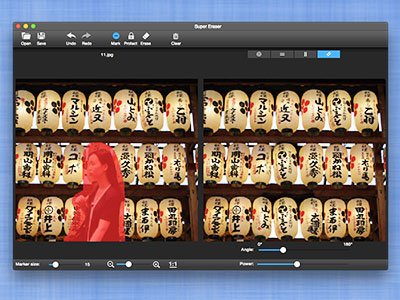
Super Eraser for Mac is a magic super photo inpaint
App to instantly remove unwanted objects from image
for Mac and instantly fix your hotos for Mac with a
few clicks. It performs the best among all other
retouching apps that ruin your photos.
Super Eraser for Mac photo retouching tool uses the
latest image processing technology to achieve the Best
InPaint treatment effect. With the intelligent
restoration algorithm, Super Eraser for Mac has the
ability to handle complex scenes or irregular shaped
hole with highly textured objects and reconstruct
missing or damaged patch from pixels around the
selection to create a seamless repair of an image.
Top Reasons to Install Super Eraser to inpaint for Mac:
- Smart Algorithm Enjoy the least amount of work for
the best results in quality and quantity.
App to instantly remove unwanted objects from image
for Mac and instantly fix your hotos for Mac with a
few clicks. It performs the best among all other
retouching apps that ruin your photos.
Super Eraser for Mac photo retouching tool uses the
latest image processing technology to achieve the Best
InPaint treatment effect. With the intelligent
restoration algorithm, Super Eraser for Mac has the
ability to handle complex scenes or irregular shaped
hole with highly textured objects and reconstruct
missing or damaged patch from pixels around the
selection to create a seamless repair of an image.
Top Reasons to Install Super Eraser to inpaint for Mac:
- Smart Algorithm Enjoy the least amount of work for
the best results in quality and quantity.
Program details
Publisher
Hanse wuE-mail
Contact the publisherPlatforms
Mac OS XFile size
13928 KBFile date
12/5/2016License
SharewareInstallation
Install & UninstallRecord updated
5/17/2016
