
KLONK Map Measurement
Version 15.2.1.6
Shareware
$39.00
2 downloads
Fast & Easy measure distances and areas on the ground on earth.
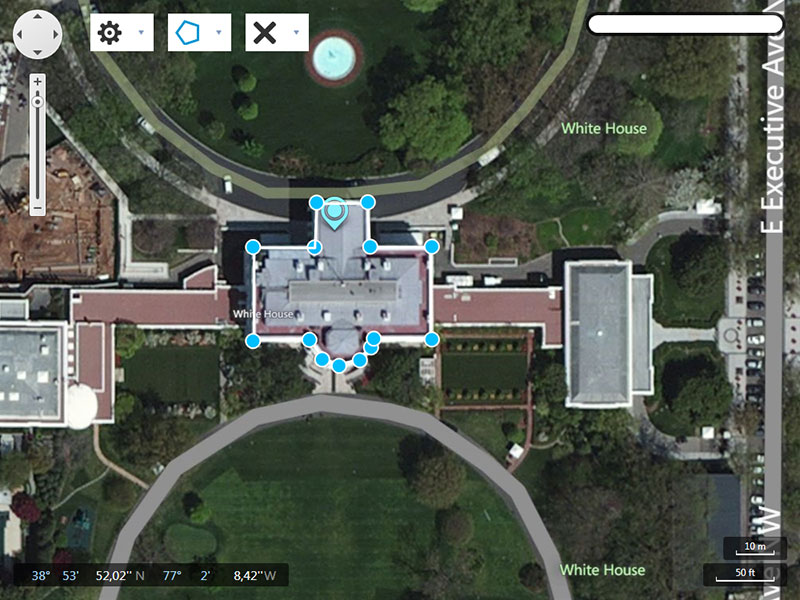
Map Measurement uses lines and shapes to check one or several distances and estimate sizes of different features on Earth. With Map Measurement, you can measure the length with a line or path, you can also measure areas using polygons. You can measure several different measurements on one map.
HOW TO CREATE A MEASUREMENT
Open Map Measurement.
Navigate to a spot on the globe by zooming, or enter an address in the search field of your interest.
Select the drawing method which you want to use(the latest used is already selected).
Line:the distance between two points on the map
Path:the distance between multiple points on the ground
Polygon:the distance or area of a geometric shape on the ground
On the map, click a starting point for your measurement.
Depending on figure type click until you have drawn the figure that you want to measure.
End the drawing by right or double clicking or by selecting the end drawing label. Except for the line drawing which ends by the second point.
You will see a line or shape on the globe that shows what you are measuring.
Map Measurement uses lines and shapes to check one or several distances and estimate sizes of different features on Earth. With Map Measurement, you can measure the length with a line or path, you can also measure areas using polygons. You can measure several different measurements on one map.
HOW TO CREATE A MEASUREMENT
Open Map Measurement.
Navigate to a spot on the globe by zooming, or enter an address in the search field of your interest.
Select the drawing method which you want to use(the latest used is already selected).
Line:the distance between two points on the map
Path:the distance between multiple points on the ground
Polygon:the distance or area of a geometric shape on the ground
On the map, click a starting point for your measurement.
Depending on figure type click until you have drawn the figure that you want to measure.
End the drawing by right or double clicking or by selecting the end drawing label. Except for the line drawing which ends by the second point.
You will see a line or shape on the globe that shows what you are measuring.
Program details
Publisher
Image Measurement CorporationE-mail
Contact the publisherHome page
http://www.mapmeasurement.com/Platforms
WinVista,WinVista x64,Windows XP,Win7 x32,Win7 x64,Win8 x32,Win8 x64,WinServer,Windows 2000File size
59670 KBFile date
11/4/2015License
SharewareExpires after
10 daysInstallation
Install & UninstallRecord updated
11/25/2015