
Convert Lotus Notes Files to PST
Version 1.0
Shareware
$129.00
0 downloads
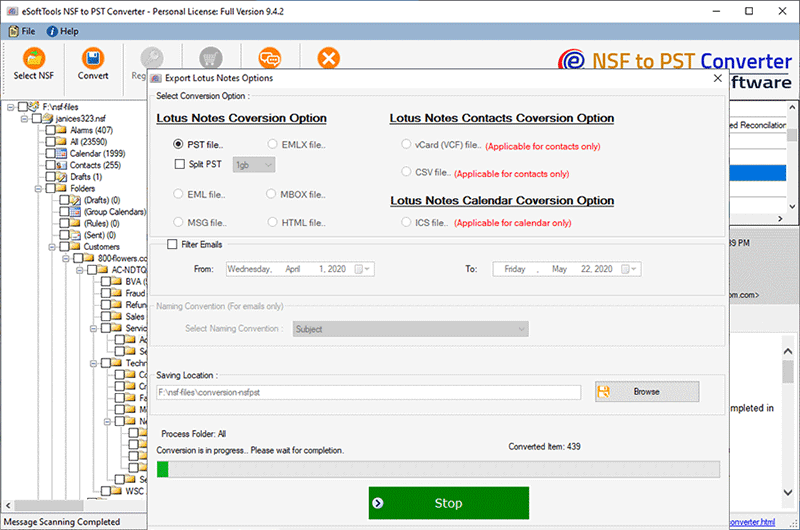
Download Lotus Notes file converter software if you are using IBM Lotus Notes and want switch from NSF to PST file. This suggested tool is efficient to convert Lotus Notes files to PST file with complete database including emails, contacts, journals, calendars, all email attachments and related email properties without any data loss. Software is masterly designed with advanced features and methodology for Lotus Notes file recovery as well as conversion to multiple file formats. With the use of eSoftTools unique application users can migrate NSF contacts separately in CSV file format. Here in this application users can option to split large sized PST file, after converting data from Lotus Notes to PST file. Immediately install Lotus Notes to PST converter tool for effortless recovery of Lotus Notes data and import entirely to MS Outlook.
NSF to PST Converter with Advanced Features
* Convert Lotus Notes files to PST or EML or MSG
* Simple GUI simple to understand for non-technical users also
* Successfully recover Lotus Notes file to make existing data readable
* Contacts are easy to import from Lotus Notes file to CSV format separately
* Export live mail data completely like emails, contacts, calendars, journals etc.
* Make Lotus Notes emails readable in MS Outlook with entire related email properties
* Import emails from IBM Lotus Notes NSF file to PST file together with attachments completely
Free download available demo for Lotus Notes files to PST converter software which is able to preview complete functionality before purchasing application. But after getting satisfaction with software efficiency, users must purchase licensed key, if want to save Lotus Notes to PST or in other file formats given here.
NSF to PST Converter with Advanced Features
* Convert Lotus Notes files to PST or EML or MSG
* Simple GUI simple to understand for non-technical users also
* Successfully recover Lotus Notes file to make existing data readable
* Contacts are easy to import from Lotus Notes file to CSV format separately
* Export live mail data completely like emails, contacts, calendars, journals etc.
* Make Lotus Notes emails readable in MS Outlook with entire related email properties
* Import emails from IBM Lotus Notes NSF file to PST file together with attachments completely
Free download available demo for Lotus Notes files to PST converter software which is able to preview complete functionality before purchasing application. But after getting satisfaction with software efficiency, users must purchase licensed key, if want to save Lotus Notes to PST or in other file formats given here.
Program details
Publisher
eSoftToolsE-mail
Contact the publisherPlatforms
Win7 x64,Windows XP,Windows 98,WinVista x64File size
4661 KBFile date
4/18/2016License
SharewareExpiration info
Installation
Install & UninstallRecord updated
3/1/2018