
Restore Windows Photo Viewer
Version 1.0
Freeware
Free
0 downloads
The classic Windows Photo Viewer although has not been
dropped from Windows 10, it doesn't appear in Default
Programs or Default apps in Settings when you perform
a clean install of Windows 10, or after upgrading from
a previous version of Windows. It is hidden somewhere.
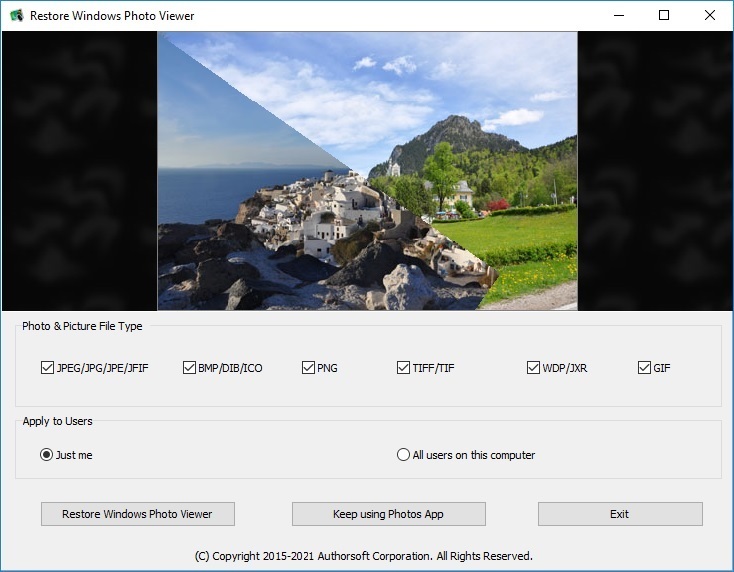
The free software bring back the classic Windows Photo
Viewer to Windows 10 to substitute for the built-in
Photos app, which is the new metro and modern
Microsoft photo viewer in Windows 10.
Features include,
Support JPEG, JPG, JPE, JFIF format.
Support BMP, DIB, ICO format.
Support PNG, TIFF, TIF.
Support GIF, WDP, JXR.
Apply changes to either current user or all users on a
computer.
Restore the missing Windows Photo Viewer to Windows 10.
Set Windows Photo Viewer as default photo viewer.
Revert to Microsoft Photos app at any time.
dropped from Windows 10, it doesn't appear in Default
Programs or Default apps in Settings when you perform
a clean install of Windows 10, or after upgrading from
a previous version of Windows. It is hidden somewhere.
The free software bring back the classic Windows Photo
Viewer to Windows 10 to substitute for the built-in
Photos app, which is the new metro and modern
Microsoft photo viewer in Windows 10.
Features include,
Support JPEG, JPG, JPE, JFIF format.
Support BMP, DIB, ICO format.
Support PNG, TIFF, TIF.
Support GIF, WDP, JXR.
Apply changes to either current user or all users on a
computer.
Restore the missing Windows Photo Viewer to Windows 10.
Set Windows Photo Viewer as default photo viewer.
Revert to Microsoft Photos app at any time.
Program details
Publisher
Brian SpreckleyE-mail
Contact the publisherPlatforms
Windows 10<br>WinServer<br>Windows XP<br>WinOtherFile size
1284 KBFile date
12/8/2016License
FreewareInstallation
Install & UninstallRecord updated
8/27/2016


