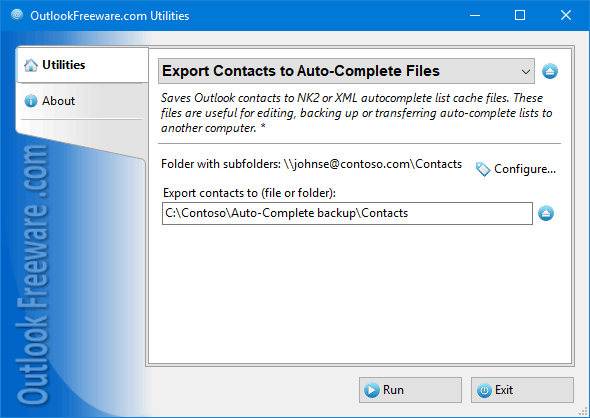

Export Contacts to Auto-Complete Files
Version 4.11
Freeware
Free
0 downloads
Free tool for saving Outlook contacts to NK2 or XML
autocomplete list cache files. These files are useful
for editing, backing up or transferring auto-complete
lists to another computer.
Outlook does not offer convenient ways to fill or
modify Auto-Complete Lists. You can delete contacts
from the Auto-Complete List one by one or clear the
Auto-Complete List. The easiest way to manage Auto-
Complete Lists contents is using Outlook contacts.
This utility saves Outlook contacts to Auto-Complete
cache files in XML or NK2 format in the selected
folder. By default, all contacts from selected Outlook
folders are stored in one Auto-Complete file, without
duplicate emails. If you specify the option to create
a separate file for each folder, contacts will be
saved in Auto-Complete files, named as the contact
folders. Another option to save is simply select the
desired contacts and export them, using the Outlook
context menu.
If there are no contacts in your Outlook, then you can
retrieve them from existing e-mail messages by using
autocomplete list cache files. These files are useful
for editing, backing up or transferring auto-complete
lists to another computer.
Outlook does not offer convenient ways to fill or
modify Auto-Complete Lists. You can delete contacts
from the Auto-Complete List one by one or clear the
Auto-Complete List. The easiest way to manage Auto-
Complete Lists contents is using Outlook contacts.
This utility saves Outlook contacts to Auto-Complete
cache files in XML or NK2 format in the selected
folder. By default, all contacts from selected Outlook
folders are stored in one Auto-Complete file, without
duplicate emails. If you specify the option to create
a separate file for each folder, contacts will be
saved in Auto-Complete files, named as the contact
folders. Another option to save is simply select the
desired contacts and export them, using the Outlook
context menu.
If there are no contacts in your Outlook, then you can
retrieve them from existing e-mail messages by using
Program details
Publisher
Relief SoftwareE-mail
Contact the publisherPlatforms
Win7 x32<br>Win7 x64<br>Windows 10<br>WinServer<br>Windows XP<br>Windows 2000<br>WinVista<br>WinVista x64<br>WinOtherFile size
307 KBFile date
1/15/2019License
FreewareInstallation
Install & UninstallRecord updated
2/1/2019