
Import Contacts from Auto-Complete Files
Version 4.10
Freeware
Free
0 downloads
Free toool for importing Outlook contacts from NK2,
DAT or XML autocomplete list cache files into the
specified folder.
Sometimes, because of failed migrations or mistakes,
important contacts in Outlook contacts folders may be
lost. Although contacts are gone, some contacts can
still be recovered from the Auto-Complete List cache
files.
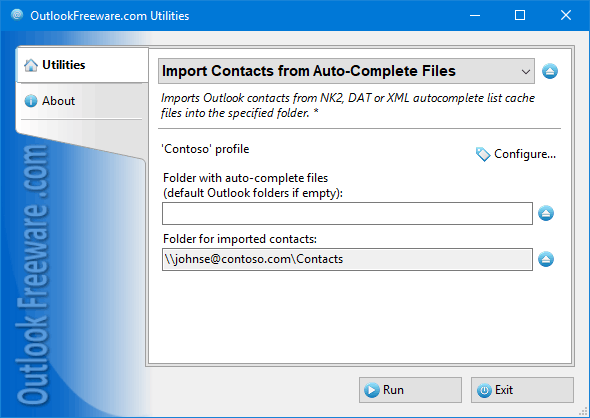
This free utility creates Outlook contacts from Auto-
Complete Lists. If the folder with Auto-Complete files
is not specified, the utility uses a default folder
with Outlook data files for the current user. All
contacts found in NK2, DAT, and XML Auto-Complete
files will be imported into the specified contact
folder. When importing, the utility checks contacts
for duplicates; same addresses are ignored. If you
have several Auto-Complete List files (for example,
for different Outlook profiles or users), there is an
option to create separate contact folders for each
AutoComplete file. In this case, multiple subfolders
will be created in the destination folder named after
DAT or XML autocomplete list cache files into the
specified folder.
Sometimes, because of failed migrations or mistakes,
important contacts in Outlook contacts folders may be
lost. Although contacts are gone, some contacts can
still be recovered from the Auto-Complete List cache
files.
This free utility creates Outlook contacts from Auto-
Complete Lists. If the folder with Auto-Complete files
is not specified, the utility uses a default folder
with Outlook data files for the current user. All
contacts found in NK2, DAT, and XML Auto-Complete
files will be imported into the specified contact
folder. When importing, the utility checks contacts
for duplicates; same addresses are ignored. If you
have several Auto-Complete List files (for example,
for different Outlook profiles or users), there is an
option to create separate contact folders for each
AutoComplete file. In this case, multiple subfolders
will be created in the destination folder named after
Program details
Publisher
Outlook FreewareE-mail
Contact the publisherPlatforms
Win7 x32<br>Win7 x64<br>Windows 10<br>WinServer<br>Windows XP<br>Windows 2000<br>WinVista<br>WinVista x64<br>WinOtherFile size
307 KBFile date
3/9/2018License
FreewareInstallation
Install & UninstallRecord updated
10/4/2018