
Update Linked Attachments for Outlook
Version 4.10
Freeware
Free
0 downloads
This free utility changes the location of the files in
the linked attachments of email messages, contacts,
calendars, tasks, and other Outlook items. The links
remain in place as attachments - the utility only
changes the location of the files to which they point.
Replacing Outlook attachments with links is a
convenient and easy way to free up space in your
mailbox or Exchange Server public folders. After
running the "Replace Attachments with Links" utility,
file attachments are saved to the specified location
and links are placed instead of them. Sometimes, you
might want to move the saved attachment files to
another location, for example, if you change your
computer, rename the network share, or even change the
drive letter or the name of the folder with
attachments.
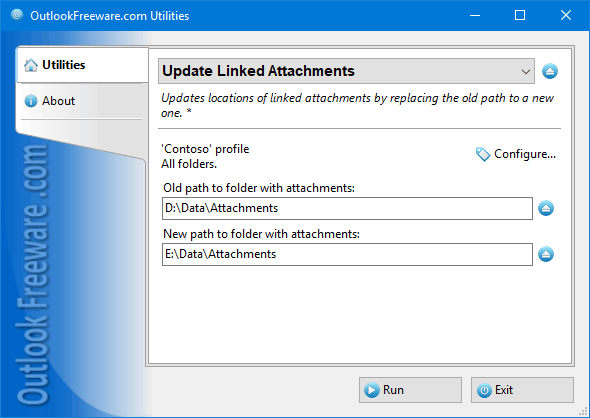
This utility replaces the location of files in links
to Outlook attachments. You just need to select
Outlook folders, specify the old and the new location
of the files, and then run the utility. The utility
will replace the old location to the new one in all
the linked attachments of email messages, contacts,
calendars, tasks, and other Outlook items. The links
remain in place as attachments - the utility only
changes the location of the files to which they point.
Replacing Outlook attachments with links is a
convenient and easy way to free up space in your
mailbox or Exchange Server public folders. After
running the "Replace Attachments with Links" utility,
file attachments are saved to the specified location
and links are placed instead of them. Sometimes, you
might want to move the saved attachment files to
another location, for example, if you change your
computer, rename the network share, or even change the
drive letter or the name of the folder with
attachments.
This utility replaces the location of files in links
to Outlook attachments. You just need to select
Outlook folders, specify the old and the new location
of the files, and then run the utility. The utility
will replace the old location to the new one in all
Program details
Publisher
Outlook FreewareE-mail
Contact the publisherPlatforms
Win7 x32<br>Win7 x64<br>Windows 10<br>WinServer<br>Windows XP<br>Windows 2000<br>WinVista<br>WinVista x64<br>WinOtherFile size
302 KBFile date
11/11/2018License
FreewareInstallation
Install & UninstallRecord updated
11/26/2018