VIPost
Version 1.0
Commercial Demo
$30.00
0 downloads
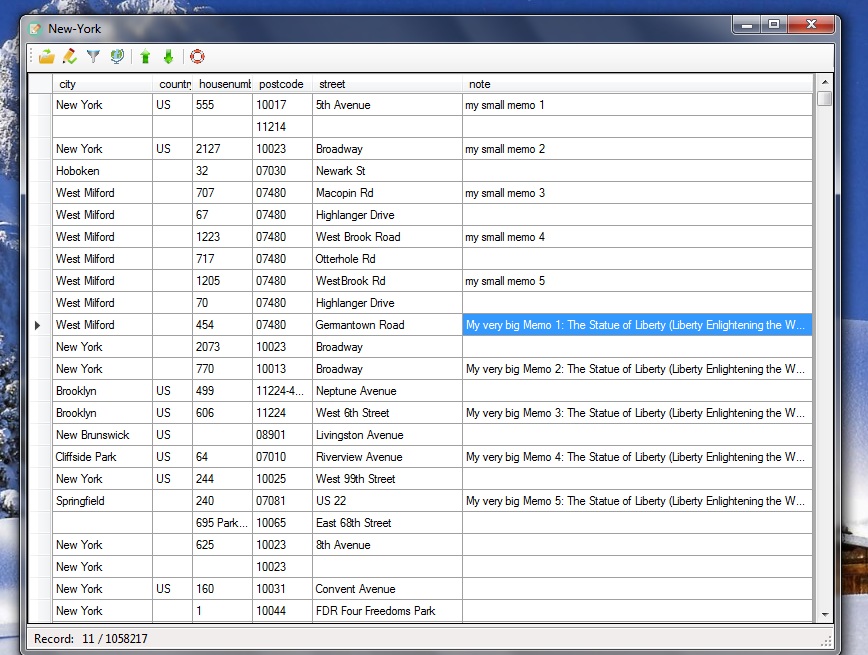
- Open the database file (eg New-York.mde) with the "Open Database" button;
- In the desired data set, enter "Note" and enter your short note there;
- For large notes (up to about 3.5 pages of A4 format) it is convenient to use the dialog "Edit record" for this;
- With the button "Export all notes as text file" you can create a text file with all notes;
- Then, if necessary, you can insert all notes from this text file back into the table (button "Import notes from text file");
- With the button "Show to the map" you can see the current record in the browser on the map. For that it is used www.openstreetmap.org portal;
- With the button "Find records" you can set up a "filter";
- As a filter you can enter only a small part of the word, small and big letters do not matter
- To remove filters, display the "Find records" dialog and then press OK (without inserting anything);
Tips and tricks:
- Wait a bit until the table is opened (eg for New-York.mde with more than million records that can take a couple of minutes);
- You can resize program and dialog window by right-down corner draw;
- To make columns in table wider or narrower, place the mouse between two columns on the tabhead and drag left or right;
- For movement in table you use:
The arrow keys (left, right, up, down);
Ctrl + arrow keys;
Home and End keys;
Ctrl + Home and End keys;
Image-up and Image Down buttons;
- To sort the table by desired column, click the corresponding header in table;
- For example, in the zip code table header "City", all cities will be sorted as A ... Z. Click it again and it will be sorted as Z ... A;
- To remove sort, select "Search records" dialog and then press OK (without inserting anything);
- In the Edit Record dialog, Note Field to select the entire note (for deletion or copying): Ctrl + Home, hold Shift, and press Ctrl + End;
- In the desired data set, enter "Note" and enter your short note there;
- For large notes (up to about 3.5 pages of A4 format) it is convenient to use the dialog "Edit record" for this;
- With the button "Export all notes as text file" you can create a text file with all notes;
- Then, if necessary, you can insert all notes from this text file back into the table (button "Import notes from text file");
- With the button "Show to the map" you can see the current record in the browser on the map. For that it is used www.openstreetmap.org portal;
- With the button "Find records" you can set up a "filter";
- As a filter you can enter only a small part of the word, small and big letters do not matter
- To remove filters, display the "Find records" dialog and then press OK (without inserting anything);
Tips and tricks:
- Wait a bit until the table is opened (eg for New-York.mde with more than million records that can take a couple of minutes);
- You can resize program and dialog window by right-down corner draw;
- To make columns in table wider or narrower, place the mouse between two columns on the tabhead and drag left or right;
- For movement in table you use:
The arrow keys (left, right, up, down);
Ctrl + arrow keys;
Home and End keys;
Ctrl + Home and End keys;
Image-up and Image Down buttons;
- To sort the table by desired column, click the corresponding header in table;
- For example, in the zip code table header "City", all cities will be sorted as A ... Z. Click it again and it will be sorted as Z ... A;
- To remove sort, select "Search records" dialog and then press OK (without inserting anything);
- In the Edit Record dialog, Note Field to select the entire note (for deletion or copying): Ctrl + Home, hold Shift, and press Ctrl + End;
Program details
Publisher
Valeri VlassovE-mail
Contact the publisherPlatforms
Win7 x32,Win7 x64,Win8 x32,Win8 x64,Windows 10,Windows XP,OtherFile size
1363 KBFile date
1/25/2017License
Commercial DemoExpiration info
No other InfoInstallation
Install & UninstallRecord updated
2/3/2017