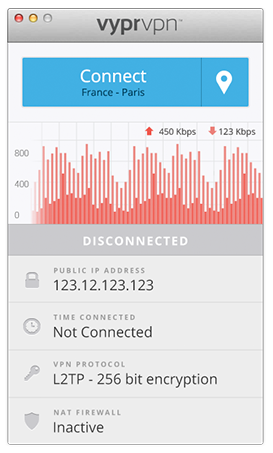

VyprVPN for Mac
Version 4.1.0.8945
Freeware
Free
0 downloads
The VyprVPN for Mac application automatically
configures and simplifies managing your VPN
connections on your desktop and laptop devices. Switch
freely between 40+ global server locations and
multiple VPN protocols with a single click. VyprVPN
also offers cutting-edge apps for Windows, iOS and
Android devices. The VyprVPN apps feature a sleek and
intuitive look and feel, with powerful new features
and customization options. The apps are faster, easier-
to-use, and more stable and intuitive than any other
free VPN app available!
Unlike most free VPN providers, VyprVPN is not an
outsourced or hosted solution that relies on third
parties to deliver its VPN service. Golden Frog writes
100% of its VPN server software, manages its own
network, and owns the hardware to ensure your privacy
is protected and your VPN connection speeds are fast.
The VyprVPN for Mac App includes:
Sleek 2.0 Interface with Retina support - New look and
feel with powerful new features and customization
options
Fast One-Click Connect - Connect and disconnect your
VPN with a single click.
Easily encrypt your internet connection and secure
your personal data
Faster Server Switching - View, select and switch
easily between all 40+ VyprVPN server locations in
North America, Europe, Asia and Oceania. You can also
favorite specific servers for easy access
Easily Switch VPN Protocols - Choose between PPTP,
L2TP, OpenVPN (160 bit encryption) and OpenVPN (256
bit encryption)
VyprVPN Speed Graph - Monitor your connection speed
and view your upload and download speeds with VyprVPN
enabled or disabled
Ping Test - Ping test the VyprVPN servers to choose
the fastest server with the lowest ping time
Easy Access From the Mac Menu Bar - Connect and switch
server locations, and view your IP address and
connection speed from the Mac Menu Bar.
VyprVPN service is required to use the apps. Learn
more about VyprVPN service and sign up for a free VPN
account at www.goldenfrog.com/vyprvpn
configures and simplifies managing your VPN
connections on your desktop and laptop devices. Switch
freely between 40+ global server locations and
multiple VPN protocols with a single click. VyprVPN
also offers cutting-edge apps for Windows, iOS and
Android devices. The VyprVPN apps feature a sleek and
intuitive look and feel, with powerful new features
and customization options. The apps are faster, easier-
to-use, and more stable and intuitive than any other
free VPN app available!
Unlike most free VPN providers, VyprVPN is not an
outsourced or hosted solution that relies on third
parties to deliver its VPN service. Golden Frog writes
100% of its VPN server software, manages its own
network, and owns the hardware to ensure your privacy
is protected and your VPN connection speeds are fast.
The VyprVPN for Mac App includes:
Sleek 2.0 Interface with Retina support - New look and
feel with powerful new features and customization
options
Fast One-Click Connect - Connect and disconnect your
VPN with a single click.
Easily encrypt your internet connection and secure
your personal data
Faster Server Switching - View, select and switch
easily between all 40+ VyprVPN server locations in
North America, Europe, Asia and Oceania. You can also
favorite specific servers for easy access
Easily Switch VPN Protocols - Choose between PPTP,
L2TP, OpenVPN (160 bit encryption) and OpenVPN (256
bit encryption)
VyprVPN Speed Graph - Monitor your connection speed
and view your upload and download speeds with VyprVPN
enabled or disabled
Ping Test - Ping test the VyprVPN servers to choose
the fastest server with the lowest ping time
Easy Access From the Mac Menu Bar - Connect and switch
server locations, and view your IP address and
connection speed from the Mac Menu Bar.
VyprVPN service is required to use the apps. Learn
more about VyprVPN service and sign up for a free VPN
account at www.goldenfrog.com/vyprvpn
Program details
Publisher
Golden FrogE-mail
Contact the publisherPlatforms
Mac OS XFile size
30496 KBFile date
7/22/2020License
FreewareInstallation
Install & UninstallRecord updated
11/2/2020


