
WinExt Free
Version 2.0
Freeware
Free
0 downloads
WinExt is a FREE utilities kit for Windows. You can
enjoy the following features by using it: 1. Quickly
find the duplicate files on your drives relied on file
contents. Key features: comparing file contents, 100%
accurate result. High-speed comparison algorithm, very
fast. Only need 1 click to get result. Reusable
result: save / load the duplicate files listing. Sorts
result by size in descending, colored groups. 2.
Quickly see all drives/directories/files size in 1
tree view, in order to let you to do the manual disk
cleaning work easily. Key features: operate resources
in batch mode. Sort resources by size in descending
order. Intelligent unit and decimal of size. 3. See
and open more recent used resources (files and
directories). And see more properties of the recent
resources, such as path, size, type, date modified and
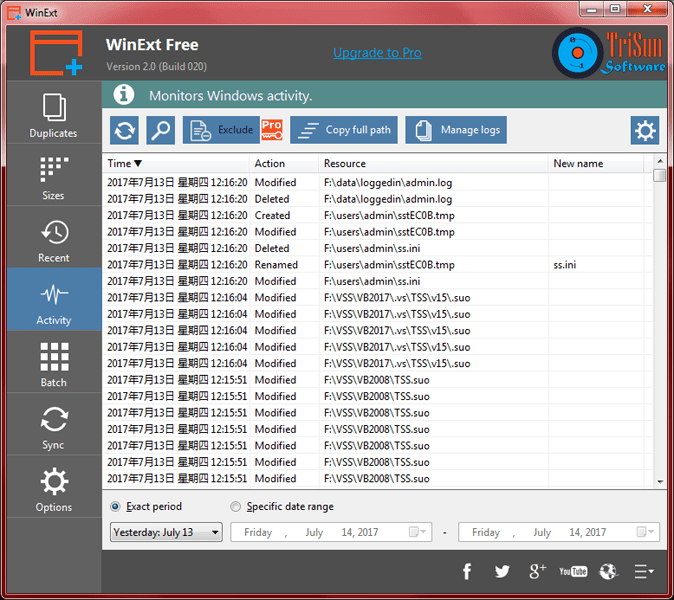
date created. 4. Monitor the operations for Windows
automatically, such as 'Deleted', 'Renamed', 'Created'
and 'Modified' actions of files and folders. 5. Select
some resources (files / folders) first, and then you
can make the following actions on them at once: move
enjoy the following features by using it: 1. Quickly
find the duplicate files on your drives relied on file
contents. Key features: comparing file contents, 100%
accurate result. High-speed comparison algorithm, very
fast. Only need 1 click to get result. Reusable
result: save / load the duplicate files listing. Sorts
result by size in descending, colored groups. 2.
Quickly see all drives/directories/files size in 1
tree view, in order to let you to do the manual disk
cleaning work easily. Key features: operate resources
in batch mode. Sort resources by size in descending
order. Intelligent unit and decimal of size. 3. See
and open more recent used resources (files and
directories). And see more properties of the recent
resources, such as path, size, type, date modified and
date created. 4. Monitor the operations for Windows
automatically, such as 'Deleted', 'Renamed', 'Created'
and 'Modified' actions of files and folders. 5. Select
some resources (files / folders) first, and then you
can make the following actions on them at once: move
Program details
Publisher
Nosa LeeE-mail
Contact the publisherHome page
http://www.trisunsoft.com/we/Platforms
Win7 x32<br>Win7 x64<br>Windows 10<br>WinServer<br>Windows XP<br>Windows 2000<br>WinVista<br>WinVista x64<br>WinOtherFile size
668 KBFile date
12/7/2017License
FreewareInstallation
Install & UninstallRecord updated
7/12/2017