
PDF Compare
Version 1.0
Shareware
$99.00
0 downloads
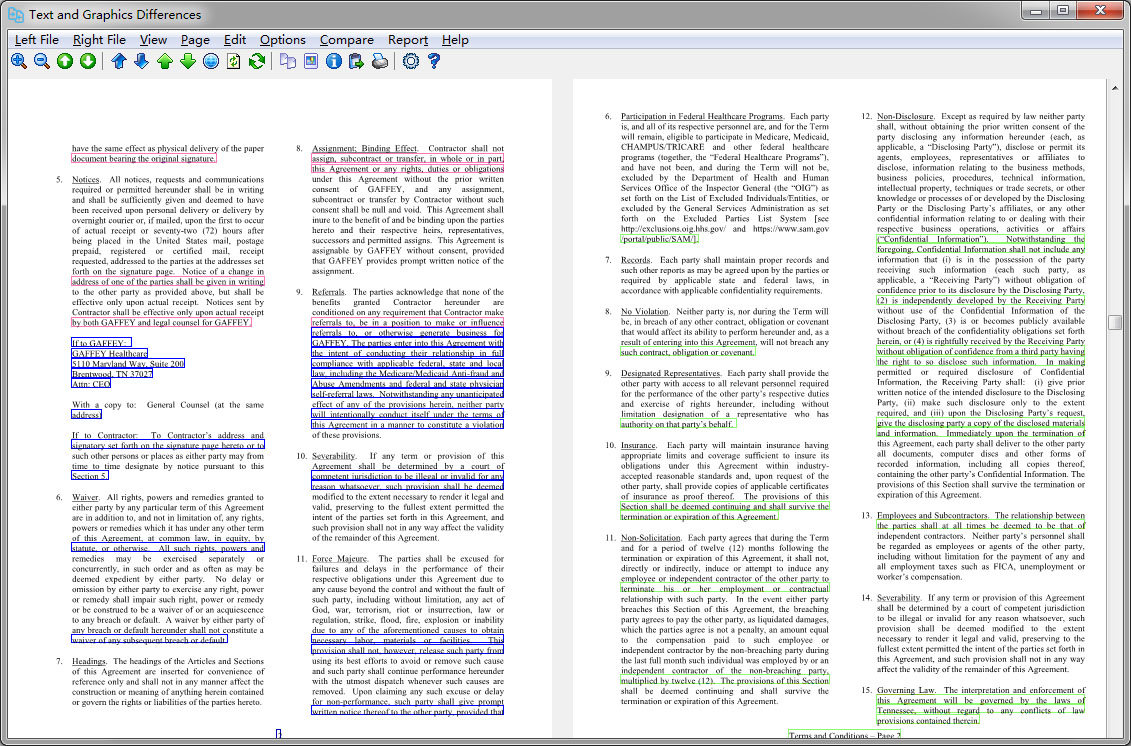
PDF Compare is an effective software application that
identifies changes and differences between PDF files.
Visually comparing two PDF files to identify changes
or differences is harder than it sounds; hard enough,
not to mention extremely boring. But it's all too easy
to miss subtle differences, and some changes might not
be visible at all. PDF Compare is the software tool
that can do the job for you much faster and more
thoroughly, other than putting yourself through it.
With dual file display panes, this efficient tool
makes quick work of a tedious but necessary job.
Six different ways to compare the left and right PDF
files are available, Compare Text and Graphics, Visual
Compare, Structural Compare, Simple Textual
Compare, Advanced Textual Compare, and Byte-by-Byte
Compare. You can set PDF Compare to compare appearance
(i.e. compare visually) or text (i.e. compare text),
zoom in or out, and navigate through multiple pages,
but most of the analyzes and comparisons are done by
this tool automatically when you press Compare, and
the tool very rapidly highlights every difference in
each view. The software quickly presents a report
detailing differences between the PDF documents when
you press Create Report.
In addition to side-by-side main views, PDF Compare
has a top panel that includes page navigation, fit to
height, fit to width, zoom in, zoom out, search, and
print buttons as well as access to Options, Help, and
About.
Unlike other PDF comparer, one neat feature of PDF
Compare is the ability to save any section of any PDF
document into text or picture that we could put it
elsewhere for other uses. Now you would have a basic
PDF editor to extract text and graphics from PDF
files, copy or save them to files.
PDF Compare is a highly specific tool that does a
highly specific job, and people who need quickly
pinpoint changes by comparing two versions of a PDF
file would find themselves appreciate the software
without comparing PDF files the hard way.
identifies changes and differences between PDF files.
Visually comparing two PDF files to identify changes
or differences is harder than it sounds; hard enough,
not to mention extremely boring. But it's all too easy
to miss subtle differences, and some changes might not
be visible at all. PDF Compare is the software tool
that can do the job for you much faster and more
thoroughly, other than putting yourself through it.
With dual file display panes, this efficient tool
makes quick work of a tedious but necessary job.
Six different ways to compare the left and right PDF
files are available, Compare Text and Graphics, Visual
Compare, Structural Compare, Simple Textual
Compare, Advanced Textual Compare, and Byte-by-Byte
Compare. You can set PDF Compare to compare appearance
(i.e. compare visually) or text (i.e. compare text),
zoom in or out, and navigate through multiple pages,
but most of the analyzes and comparisons are done by
this tool automatically when you press Compare, and
the tool very rapidly highlights every difference in
each view. The software quickly presents a report
detailing differences between the PDF documents when
you press Create Report.
In addition to side-by-side main views, PDF Compare
has a top panel that includes page navigation, fit to
height, fit to width, zoom in, zoom out, search, and
print buttons as well as access to Options, Help, and
About.
Unlike other PDF comparer, one neat feature of PDF
Compare is the ability to save any section of any PDF
document into text or picture that we could put it
elsewhere for other uses. Now you would have a basic
PDF editor to extract text and graphics from PDF
files, copy or save them to files.
PDF Compare is a highly specific tool that does a
highly specific job, and people who need quickly
pinpoint changes by comparing two versions of a PDF
file would find themselves appreciate the software
without comparing PDF files the hard way.
Program details
Publisher
Pierre GillesE-mail
Contact the publisherPlatforms
Win7 x32<br>Win7 x64<br>Win8 x32<br>Win8 x64<br>Windows 10<br>WinServer<br>Windows XP<br>WinVista<br>WinVista x64File size
5695 KBFile date
6/10/2017License
SharewareInstallation
Install & UninstallRecord updated
10/7/2017