
My WiFi Hotspot
Version 5.0
Freeware
Free
0 downloads
Share your Internet connection from one PC to other PC
or mobile devices without using a WiFi router. If you
have a PC that has a wired Internet connection and a
wireless network card, you can definitely let your
other PC or phone or tablet access the Internet. My
WiFi Hotspot software quickly turns your PC into a
WiFi hot spot, and you can share your Internet
connection with maximum 256 connected devices.
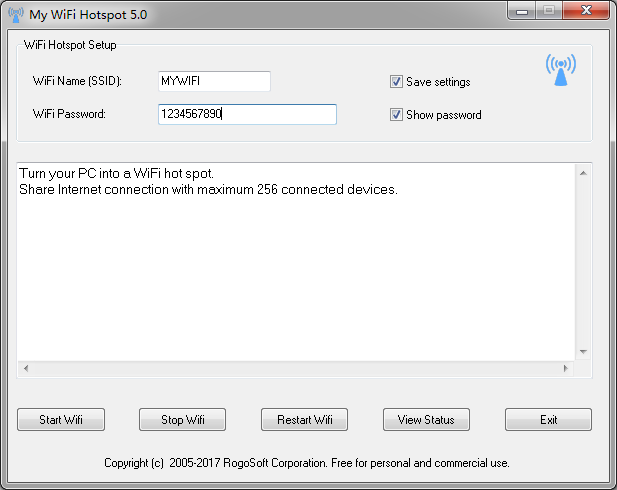
The user interface of the software is intuitive, and
you can turn your PC into a WiFi hot spot of your own
all in one click, and view which devices are connected
to your WiFi hot spot. Just run the software after
making sure that your wireless card is on, give the
WiFi connection a name, specify the password you want
others to access it, click Start button, and it will
work.
The data transfer between your WiFi hot spot and the
connected devices is completely secured using WPA2
PSK. Neither Wireless router nor wireless hub is
required to facilitate the data transfer. You can use
the software in hotels, cafeteria, cars, or anywhere
you can connect to the Internet.
You can save your WiFi connection name (SSID) and
password (WiFi password) before you stops your WiFi
hotspot or after a reboot of your PC. Once again the
software gets started, all the settings load
autoamtically. Any Wi-Fi capable devices, such as
smartphones, tablets or laptops should be able to
detect the WiFi hot spot and connect to it again
automatically.
You can minimize the software window and keep it on
your system tray at any time and continue working with
your PC.
Freeware, no strings attached. Free for personal and
commercial use. No .NET framework is required.
Features
Create WiFi hot spot from anywhere, at any time for
Internet access.
Convert LAN network, WLAN network, and wired
connection into wireless connection.
WPA2 PSK encryption to secure wireless connection.
Easy setup and easy sharing
The world smallest software to create WiFi hot spot,
only 505KB.
or mobile devices without using a WiFi router. If you
have a PC that has a wired Internet connection and a
wireless network card, you can definitely let your
other PC or phone or tablet access the Internet. My
WiFi Hotspot software quickly turns your PC into a
WiFi hot spot, and you can share your Internet
connection with maximum 256 connected devices.
The user interface of the software is intuitive, and
you can turn your PC into a WiFi hot spot of your own
all in one click, and view which devices are connected
to your WiFi hot spot. Just run the software after
making sure that your wireless card is on, give the
WiFi connection a name, specify the password you want
others to access it, click Start button, and it will
work.
The data transfer between your WiFi hot spot and the
connected devices is completely secured using WPA2
PSK. Neither Wireless router nor wireless hub is
required to facilitate the data transfer. You can use
the software in hotels, cafeteria, cars, or anywhere
you can connect to the Internet.
You can save your WiFi connection name (SSID) and
password (WiFi password) before you stops your WiFi
hotspot or after a reboot of your PC. Once again the
software gets started, all the settings load
autoamtically. Any Wi-Fi capable devices, such as
smartphones, tablets or laptops should be able to
detect the WiFi hot spot and connect to it again
automatically.
You can minimize the software window and keep it on
your system tray at any time and continue working with
your PC.
Freeware, no strings attached. Free for personal and
commercial use. No .NET framework is required.
Features
Create WiFi hot spot from anywhere, at any time for
Internet access.
Convert LAN network, WLAN network, and wired
connection into wireless connection.
WPA2 PSK encryption to secure wireless connection.
Easy setup and easy sharing
The world smallest software to create WiFi hot spot,
only 505KB.
Program details
Publisher
Sten GullanderE-mail
Contact the publisherPlatforms
Win7 x32<br>Win7 x64<br>Win8 x32<br>Win8 x64<br>Windows 10<br>WinServer<br>Windows XP<br>WinVista<br>WinVista x64File size
504 KBFile date
10/13/2017License
FreewareInstallation
Install & UninstallRecord updated
10/18/2017
