
Disk Adapter For VMware Workstation
Version 1.0
Shareware
$19.95
0 downloads
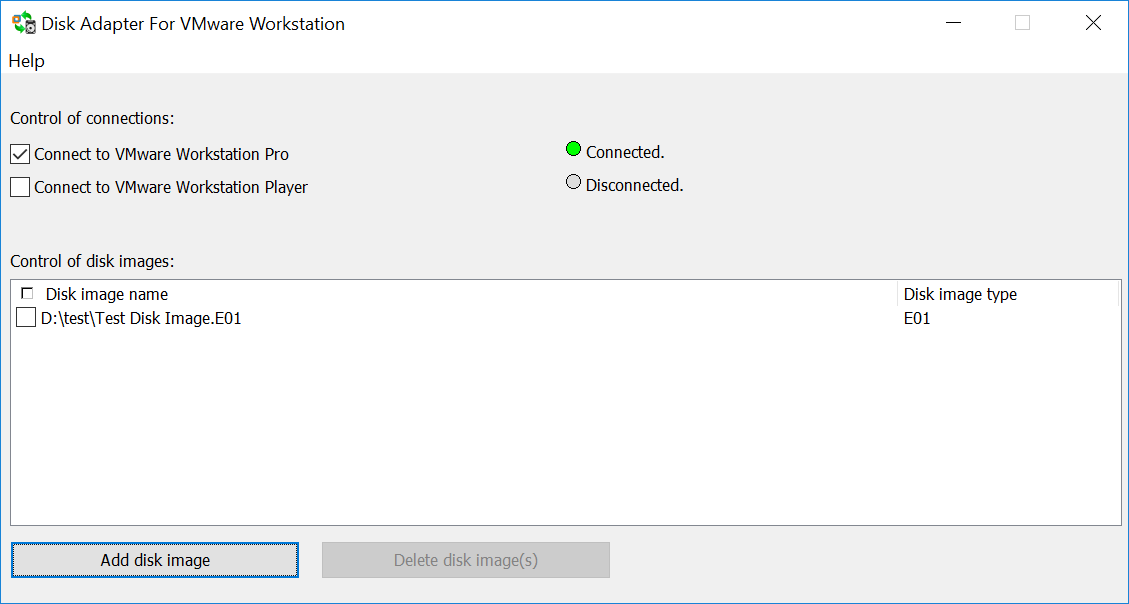
Disk Adapter For VMware Workstation by YurikSoft
offers an easy way to connecting RAW (DD) and EnCase
(.E01) disk images to VMware Workstation Pro or(and)
Player. Using the program, you will no longer need
different converters for converting Raw and EnCase
disk images to VMDK and so on.
Disk Adapter For VMware Workstation will allow you to
avoid duplication of the same disk images in different
formats. The program can work with RAW disk images in
read-write mode and with EnCase disk images in read-
only mode. You can use up to five disk images at a
time.
Requirements
- Windows 7, Windows 8, Windows 8.1, Windows 10,
Windows Server 2008 R2 SP1/2012/2012 R2/2016.
- About 15 megabytes of free space on hard disk. -
The minimum memory required on the system is 2 GB. 4
GB and above is recommended.
- VMware Workstation Pro 14, VMware Workstation
Player 14, VMware Workstation Pro 15, VMware
offers an easy way to connecting RAW (DD) and EnCase
(.E01) disk images to VMware Workstation Pro or(and)
Player. Using the program, you will no longer need
different converters for converting Raw and EnCase
disk images to VMDK and so on.
Disk Adapter For VMware Workstation will allow you to
avoid duplication of the same disk images in different
formats. The program can work with RAW disk images in
read-write mode and with EnCase disk images in read-
only mode. You can use up to five disk images at a
time.
Requirements
- Windows 7, Windows 8, Windows 8.1, Windows 10,
Windows Server 2008 R2 SP1/2012/2012 R2/2016.
- About 15 megabytes of free space on hard disk. -
The minimum memory required on the system is 2 GB. 4
GB and above is recommended.
- VMware Workstation Pro 14, VMware Workstation
Player 14, VMware Workstation Pro 15, VMware
Program details
Publisher
Yuri KonenkovE-mail
Contact the publisherPlatforms
Win7 x32<br>Win7 x64<br>Windows 10<br>WinServer<br>Windows XP<br>Windows 2000<br>WinVista<br>WinVista x64<br>WinOtherFile size
5217 KBFile date
11/28/2018License
SharewareExpiration info
Cannot add more than 10 disksInstallation
Install & UninstallRecord updated
2/25/2019