
Block Ransomware and Backup
Version 2.1.0.5
Shareware
$49.00
0 downloads
How to Block Ransomware and Automatic backup ?
There are many ways to block ransomware, malware, and
viruses. However, these malicious programs continue to
evolve, so simply blocking malicious programs with
patterns alone can infect your PC with other malicious
programs.
There is a way.
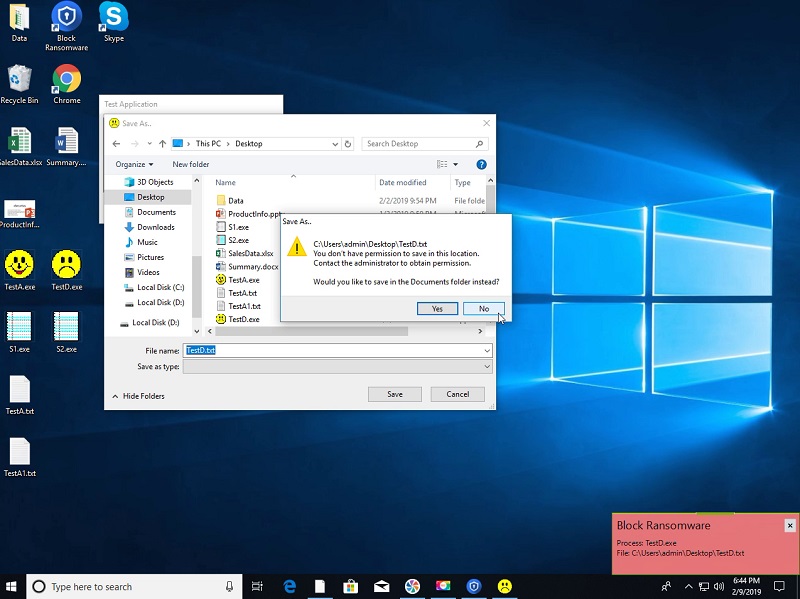
Please try the 'Block Ransomware and backup' product.
Ransomware, malware, viruses, etc. can infiltrate your
PC, but it can not damage your files.
This product allows you to set the Desktop, Documents
folder, and so on as protected folders, and allow only
the programs that are allowed (for example, MS Office
programs) to modify the files in the protected folder.
Unauthorized programs can only open the file as read-
only, or block the unauthorized program from running.
Therefore, malicious programs can not be accessed to
the protected folder.
You can also create backup files automatically
whenever you modify or create documents. These backup
files are stored in a special folder, and not all
programs can change this backup files unless you allow
it.
Use this product to protect your valuable files.
Features.
* You can specify the folders or drives to prevent
ransom-ware.
* Can create/change files in the security folder by
only the applications that you allow.
* If an unregistered application attempts to write to
the secure folder, ask the user whether to allow the
write operation.
* When the main program is terminated, it is not
possible to write or delete files in the secure
folders.
* When creating/editing a file within the specified
source folder, the Backup program automatically copies
the modified file to the backup folder.
* The backup folder can be viewed in Windows Explorer,
but it cannot be modified or deleted.
Related Videos
* Quick Guide: https://youtu.be/r1HAeKMsFnI
* See more videos:
https://www.youtube.com/channel/UCW9UHqHn07a5Tk_L2bmsXy
w
Operating System
* Windows 7 / 8 / 8.1 / 10
* Windows Server 2008 R2 / 2012 / 2016 / 2019
There are many ways to block ransomware, malware, and
viruses. However, these malicious programs continue to
evolve, so simply blocking malicious programs with
patterns alone can infect your PC with other malicious
programs.
There is a way.
Please try the 'Block Ransomware and backup' product.
Ransomware, malware, viruses, etc. can infiltrate your
PC, but it can not damage your files.
This product allows you to set the Desktop, Documents
folder, and so on as protected folders, and allow only
the programs that are allowed (for example, MS Office
programs) to modify the files in the protected folder.
Unauthorized programs can only open the file as read-
only, or block the unauthorized program from running.
Therefore, malicious programs can not be accessed to
the protected folder.
You can also create backup files automatically
whenever you modify or create documents. These backup
files are stored in a special folder, and not all
programs can change this backup files unless you allow
it.
Use this product to protect your valuable files.
Features.
* You can specify the folders or drives to prevent
ransom-ware.
* Can create/change files in the security folder by
only the applications that you allow.
* If an unregistered application attempts to write to
the secure folder, ask the user whether to allow the
write operation.
* When the main program is terminated, it is not
possible to write or delete files in the secure
folders.
* When creating/editing a file within the specified
source folder, the Backup program automatically copies
the modified file to the backup folder.
* The backup folder can be viewed in Windows Explorer,
but it cannot be modified or deleted.
Related Videos
* Quick Guide: https://youtu.be/r1HAeKMsFnI
* See more videos:
https://www.youtube.com/channel/UCW9UHqHn07a5Tk_L2bmsXy
w
Operating System
* Windows 7 / 8 / 8.1 / 10
* Windows Server 2008 R2 / 2012 / 2016 / 2019
Program details
Publisher
James xSecuritasE-mail
Contact the publisherPlatforms
Win7 x32<br>Win7 x64<br>Windows 10<br>WinServer<br>Windows XP<br>Windows 2000<br>WinVista<br>WinVista x64<br>WinOtherFile size
22461 KBFile date
2/8/2019License
SharewareInstallation
Install & UninstallRecord updated
4/3/2020
