
Hide Cloud Drive
Version 2.1.0.4
Shareware
$54.00
0 downloads
Do you want to protect your cloud sync folder safe?
Do you want to keep your cloud sync folder data safe
while you are away from your PC? This 'Hide Cloud
Drive' product hide sync folder and Tray Icon of cloud
drive. It also protects your files by hiding the
Desktop, Documents and Pictures folders.
Features
* You can apply the 'Deny Access' or 'Read Only'
policy for the selected cloud drives.
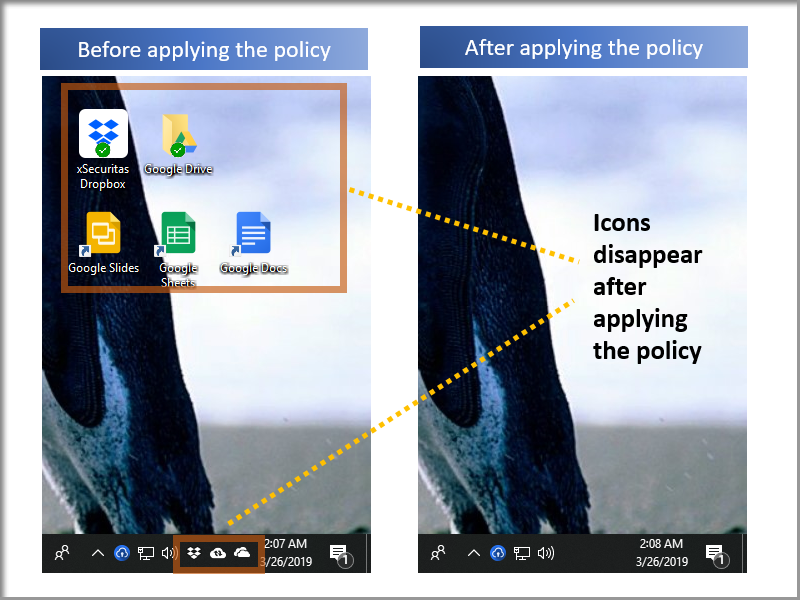
* When 'Deny Access' policy is selected, the cloud
sync-folder is inaccessible and the Tray Icon and
shortcut disappear. As a result, others can not access
Cloud Drive.
* You can also apply 'Deny Access' or 'Read Only'
policies to the Desktop, Documents, Pictures folder.
* This applies to the Cloud Drive displayed in
Explorer, not to Cloud in the Web Browser.
* If you change the Cloud Sync Folder while running
the application, the application will control all Sync
Folders before and after the change. After rebooting,
only the changed Sync Folder is controlled.
Support Cloud Drive
* Google Backup and Sync
* Google Drive File Stream
* DropBox
* Microsoft OneDrive
* Box
* Amazon Drive
Related Videos
* Quick Guide: https://youtu.be/iO4lZAyiic4
* Tutorial: https://youtu.be/fbOim1u6rlc
* See more videos:
https://www.youtube.com/channel/UCW9UHqHn07a5Tk_L2bmsXy
w
Operating System
* Windows 7 / 8 / 8.1 / 10
* Windows Server 2008 R2 / 2012 / 2016 / 2019
Do you want to keep your cloud sync folder data safe
while you are away from your PC? This 'Hide Cloud
Drive' product hide sync folder and Tray Icon of cloud
drive. It also protects your files by hiding the
Desktop, Documents and Pictures folders.
Features
* You can apply the 'Deny Access' or 'Read Only'
policy for the selected cloud drives.
* When 'Deny Access' policy is selected, the cloud
sync-folder is inaccessible and the Tray Icon and
shortcut disappear. As a result, others can not access
Cloud Drive.
* You can also apply 'Deny Access' or 'Read Only'
policies to the Desktop, Documents, Pictures folder.
* This applies to the Cloud Drive displayed in
Explorer, not to Cloud in the Web Browser.
* If you change the Cloud Sync Folder while running
the application, the application will control all Sync
Folders before and after the change. After rebooting,
only the changed Sync Folder is controlled.
Support Cloud Drive
* Google Backup and Sync
* Google Drive File Stream
* DropBox
* Microsoft OneDrive
* Box
* Amazon Drive
Related Videos
* Quick Guide: https://youtu.be/iO4lZAyiic4
* Tutorial: https://youtu.be/fbOim1u6rlc
* See more videos:
https://www.youtube.com/channel/UCW9UHqHn07a5Tk_L2bmsXy
w
Operating System
* Windows 7 / 8 / 8.1 / 10
* Windows Server 2008 R2 / 2012 / 2016 / 2019
Program details
Publisher
James xSecuritasE-mail
Contact the publisherPlatforms
Win7 x32<br>Win7 x64<br>Windows 10<br>WinServer<br>Windows XP<br>Windows 2000<br>WinVista<br>WinVista x64<br>WinOtherFile size
21222 KBFile date
4/27/2019License
SharewareInstallation
Install & UninstallRecord updated
1/12/2020