
Output Watermark
Version 2.1.0.5
Shareware
$49.00
0 downloads
Output Watermark Control
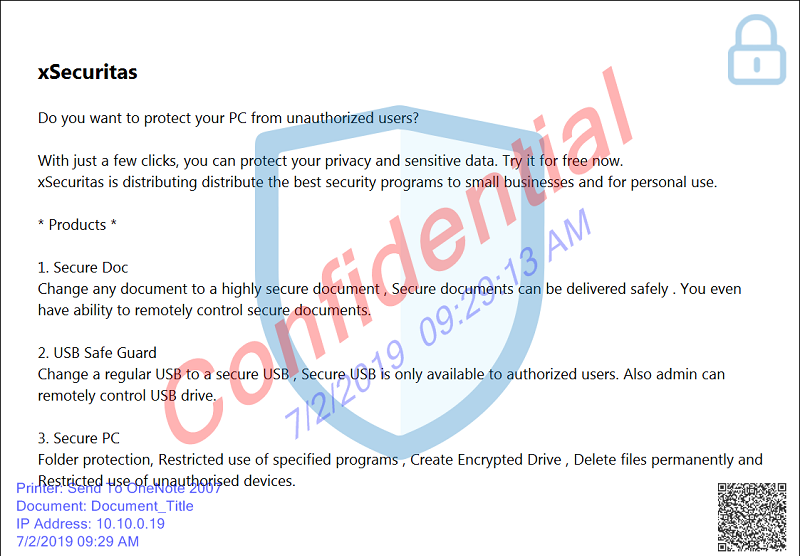
You can print the watermark on the printout. You can
place a watermark even when it is printed in PDF or
XPS. You can also decide whether to print watermarks
by application
Features
* Print the watermark on the printout.
* The watermark is printed even to PDF, XPS, etc.
* The watermark is not supported for XPS and PDF
output in some applications (such as Internet
Explorer).
* The watermark is not supported for the 'Microsoft
Store App' program.
* Determine whether watermark is printed according to
the applications
1) Watermark output only for specified applications.
2) Specified applications does not print watermark.
* If you have applications that encounter errors when
printing watermarks, you can register this process to
the exception process to handle the problem. (That is,
no watermark output)
* Can display a window asking whether to print a
watermark on output.
* Metadata watermark support: Output date and time,
printer name, document name, user name, etc. can be
output as watermark.
* QR Code can be output as a watermark
* Supports watermark font, size, color, transparency,
location, etc.
* Support
1) Up to 4 text watermarks
2) Up to 4 image watermarks
3) 1 QR Code watermark
Related Videos
* Quick Guide: https://youtu.be/HCzbHN-TSvE
* See more videos:
https://www.youtube.com/channel/UCW9UHqHn07a5Tk_L2bmsXy
w
Operating System
* Windows 7 / 8 / 8.1 / 10
* Windows Server 2008 R2 / 2012 / 2016 / 2019
You can print the watermark on the printout. You can
place a watermark even when it is printed in PDF or
XPS. You can also decide whether to print watermarks
by application
Features
* Print the watermark on the printout.
* The watermark is printed even to PDF, XPS, etc.
* The watermark is not supported for XPS and PDF
output in some applications (such as Internet
Explorer).
* The watermark is not supported for the 'Microsoft
Store App' program.
* Determine whether watermark is printed according to
the applications
1) Watermark output only for specified applications.
2) Specified applications does not print watermark.
* If you have applications that encounter errors when
printing watermarks, you can register this process to
the exception process to handle the problem. (That is,
no watermark output)
* Can display a window asking whether to print a
watermark on output.
* Metadata watermark support: Output date and time,
printer name, document name, user name, etc. can be
output as watermark.
* QR Code can be output as a watermark
* Supports watermark font, size, color, transparency,
location, etc.
* Support
1) Up to 4 text watermarks
2) Up to 4 image watermarks
3) 1 QR Code watermark
Related Videos
* Quick Guide: https://youtu.be/HCzbHN-TSvE
* See more videos:
https://www.youtube.com/channel/UCW9UHqHn07a5Tk_L2bmsXy
w
Operating System
* Windows 7 / 8 / 8.1 / 10
* Windows Server 2008 R2 / 2012 / 2016 / 2019
Program details
Publisher
James xSecuritasE-mail
Contact the publisherPlatforms
Win7 x32<br>Win7 x64<br>Windows 10<br>WinServer<br>Windows XP<br>Windows 2000<br>WinVista<br>WinVista x64<br>WinOtherFile size
24928 KBFile date
7/19/2019License
SharewareInstallation
Install & UninstallRecord updated
2/7/2020