
USB Lockit
Version 1.0
Freeware
Free
0 downloads
USB Lockit - Password Lock USB Drive.
Protects the USB drive with your photos, audios,
videos and other files from prying eyes on Android &
Windows. Once the drive is locked, nobody can access
your files.
All in 3 Easy Steps:
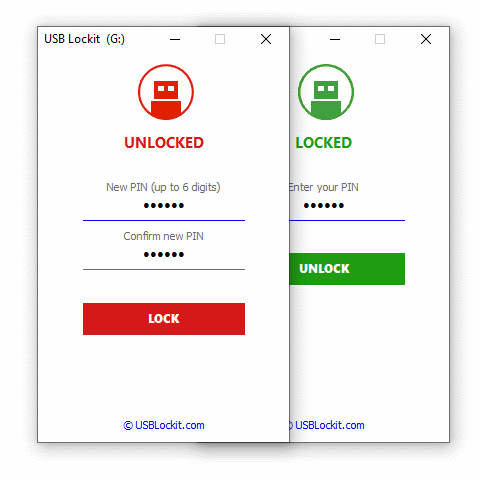
1. To lock the USB drive and protects all your files,
simply set a PIN and click on LOCK button.
2. To unlock the USB drive and access to all your
files, enter your PIN and click on UNLOCK button.
3. To relock the USB drive without entering the PIN
every time, just a click on the LOCK button.
When the USB drive is locked, your files remain safe
in all Operating Systems.
Works with all USB flash drives and external hard
drives formatted in FAT32.
Available for Android & Windows PC.
Supported language: English, German, French, Spanish,
Italian, Portuguese, Russian, Chinese.
Protects the USB drive with your photos, audios,
videos and other files from prying eyes on Android &
Windows. Once the drive is locked, nobody can access
your files.
All in 3 Easy Steps:
1. To lock the USB drive and protects all your files,
simply set a PIN and click on LOCK button.
2. To unlock the USB drive and access to all your
files, enter your PIN and click on UNLOCK button.
3. To relock the USB drive without entering the PIN
every time, just a click on the LOCK button.
When the USB drive is locked, your files remain safe
in all Operating Systems.
Works with all USB flash drives and external hard
drives formatted in FAT32.
Available for Android & Windows PC.
Supported language: English, German, French, Spanish,
Italian, Portuguese, Russian, Chinese.
Program details
Publisher
Bezze NicolaE-mail
Contact the publisherHome page
http://www.usblockit.com/Platforms
Win7 x32<br>Win7 x64<br>Windows 10<br>WinServer<br>Windows XP<br>Windows 2000<br>WinVista<br>WinVista x64<br>WinOtherFile size
11 KBFile date
12/31/2019License
FreewareInstallation
No InstallRecord updated
1/17/2020


