
MailsSoftware MBOX to PST Converter
Version 1.0
Shareware
$39.00
0 downloads
– Nowadays many people want to shift from MBOX based
email client to Outlook, which imports (accepts) data
in PST file format. Therefore, you need to convert
MBOX to PST. MailsSoftware MBOX to PST converter is
one of the finest tools among various available in
the market. Features of the tool –
• Supports MBOX of more than 25 email clients.
• Scan & fix all the bugs in MBOX file.
• Open the MBOX in its original data.
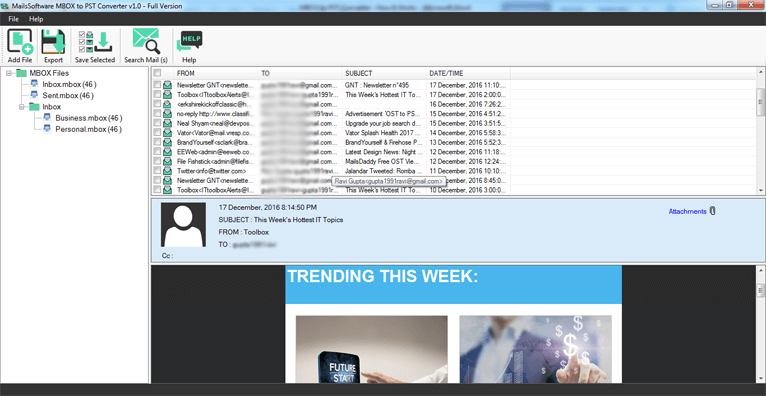
• Preview the actual hierarchy of MBOX file folders.
• Advanced search option to search any file.
• Multiple export option MBOX to PST, MHTML, HTML,
EML, RTF and EMLX.
• User-friendly interface & Save and easy to use.
• Preserve all the MBOX property in converted PST.
• Made for Windows & support all Windows versions.
• Provide fully healthy UNICODE PST.
This MBOX to PST converter also has a free demo
version. The Demo version is made so that the user
can get the live experience of software working and
get familiar with all its features. But the demo
version comes with some restrictions, it can only
export the first email from all folders & subfolders.
You can download it from MailsSoftware official
website.
How to use it –
Download the utility & Run it in your system.
1 - Click on Add File >> Browse the MBOX from the
system.
This moment the MBOX file is fully scanned by the
tool algorithms, you can see the complete data of it
in its proper hierarchy of folders & subfolders.
2 - Click Export >> Choose “PST” as export option.
3 - Provide the destination Path >> Click Export.
email client to Outlook, which imports (accepts) data
in PST file format. Therefore, you need to convert
MBOX to PST. MailsSoftware MBOX to PST converter is
one of the finest tools among various available in
the market. Features of the tool –
• Supports MBOX of more than 25 email clients.
• Scan & fix all the bugs in MBOX file.
• Open the MBOX in its original data.
• Preview the actual hierarchy of MBOX file folders.
• Advanced search option to search any file.
• Multiple export option MBOX to PST, MHTML, HTML,
EML, RTF and EMLX.
• User-friendly interface & Save and easy to use.
• Preserve all the MBOX property in converted PST.
• Made for Windows & support all Windows versions.
• Provide fully healthy UNICODE PST.
This MBOX to PST converter also has a free demo
version. The Demo version is made so that the user
can get the live experience of software working and
get familiar with all its features. But the demo
version comes with some restrictions, it can only
export the first email from all folders & subfolders.
You can download it from MailsSoftware official
website.
How to use it –
Download the utility & Run it in your system.
1 - Click on Add File >> Browse the MBOX from the
system.
This moment the MBOX file is fully scanned by the
tool algorithms, you can see the complete data of it
in its proper hierarchy of folders & subfolders.
2 - Click Export >> Choose “PST” as export option.
3 - Provide the destination Path >> Click Export.
Program details
Publisher
Harsh DixitE-mail
Contact the publisherPlatforms
MS-DOS<br>Win7 x32<br>Win7 x64<br>Win8 x32<br>Win8 x64<br>Windows 10<br>WinServer<br>Windows XP<br>Windows 2000<br>Windows NT 3.x<br>Windows NT 4.x<br>WinVista<br>WinVista x64<br>WinMobile<br>Windows CE 1.0<br>Windows CE 2.0<br>WinOtherFile size
7086 KBFile date
4/1/2020License
SharewareExpiration info
Installation
Install & UninstallRecord updated
4/4/2020