
Print to PDF Toolkit Pro
Version 2.0
Shareware
$9.95
0 downloads
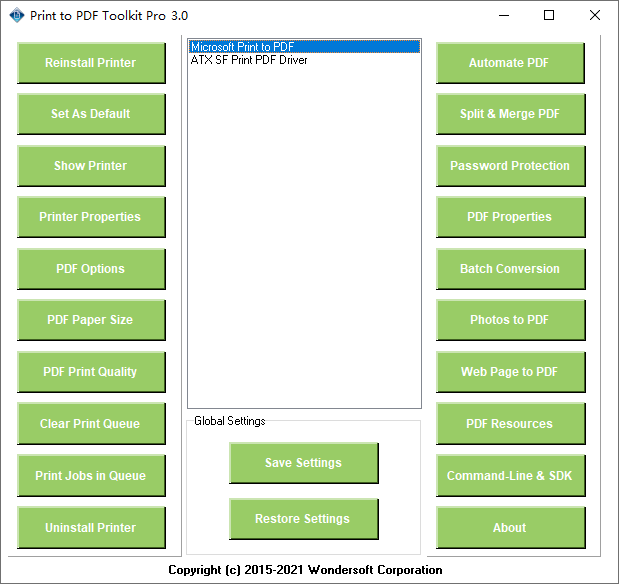
Print to PDF Toolkit Pro software enhances Microsoft
Print to PDF printer on Windows 10 in that it allows
users to automatically open PDF files after creation,
save PDF files without prompt (no Save As PDF dialog),
automatically save PDF files to a folder or a specific
file, append and merge PDF files, password protect PDF
files, batch print, batch conversion, define custom
paper size, adjust PDF print quality, set PDF
properties metadata, convert photos to PDF, convert
web pages to PDF, print to PDF and email. Print to PDF
Toolkit Pro does not install any other PDF printer
driver, rather it enriches the functionalities and
features of Microsoft Print to PDF printer on your
Windows 10 computer. It is a great tool for PDF
automation and save your budget to make Microsoft
Print to PDF feature-rich and comparable to other
professional PDF creation software.
Major Features
Add More Paper Sizes and Custom Paper Size
Adjust PDF resolution and PDF Print Quality
Automatically save PDF files to a specific folder or a
specific file
Save PDF files without prompt
Email PDF document as email attachment
Automatically Open PDF document after creation
Post-Processing for PDF documents
Password Protection
Permission Management
Avoid Information Leakage in PDF Document Properties
Create PDF document with splendid page mode and layout
mode
Backup and Restore Settings of Microsoft Print to PDF
printer
Repair and Troubleshooting Microsoft Print to PDF
printer
Batch Conversion
Microsoft Print to PDF does not allow you to convert
other types of documents to PDF files in batch. Print
to PDF Toolkit Pro allows batch conversion from the
following file types to PDF,
Microsoft Word to PDF (.DOC, .DOCX)
Microsoft Excel to PDF (.XLS, .XLS)
Microsoft PowerPoint to PDF (.PPT, .PPTX)
Rich Txt Format to PDF (.RTF)
Plain Text Format to PDF (.TXT)
Web Pages to PDF (.HTM, .HTML, SHTML)
Photos to PDF (.JPG, .JPEG, .PNG, .BMP)
AutoCAD drawings to PDF (.DWG, .DXF, .DWF)
Print to PDF printer on Windows 10 in that it allows
users to automatically open PDF files after creation,
save PDF files without prompt (no Save As PDF dialog),
automatically save PDF files to a folder or a specific
file, append and merge PDF files, password protect PDF
files, batch print, batch conversion, define custom
paper size, adjust PDF print quality, set PDF
properties metadata, convert photos to PDF, convert
web pages to PDF, print to PDF and email. Print to PDF
Toolkit Pro does not install any other PDF printer
driver, rather it enriches the functionalities and
features of Microsoft Print to PDF printer on your
Windows 10 computer. It is a great tool for PDF
automation and save your budget to make Microsoft
Print to PDF feature-rich and comparable to other
professional PDF creation software.
Major Features
Add More Paper Sizes and Custom Paper Size
Adjust PDF resolution and PDF Print Quality
Automatically save PDF files to a specific folder or a
specific file
Save PDF files without prompt
Email PDF document as email attachment
Automatically Open PDF document after creation
Post-Processing for PDF documents
Password Protection
Permission Management
Avoid Information Leakage in PDF Document Properties
Create PDF document with splendid page mode and layout
mode
Backup and Restore Settings of Microsoft Print to PDF
printer
Repair and Troubleshooting Microsoft Print to PDF
printer
Batch Conversion
Microsoft Print to PDF does not allow you to convert
other types of documents to PDF files in batch. Print
to PDF Toolkit Pro allows batch conversion from the
following file types to PDF,
Microsoft Word to PDF (.DOC, .DOCX)
Microsoft Excel to PDF (.XLS, .XLS)
Microsoft PowerPoint to PDF (.PPT, .PPTX)
Rich Txt Format to PDF (.RTF)
Plain Text Format to PDF (.TXT)
Web Pages to PDF (.HTM, .HTML, SHTML)
Photos to PDF (.JPG, .JPEG, .PNG, .BMP)
AutoCAD drawings to PDF (.DWG, .DXF, .DWF)
Program details
Publisher
Michel DucE-mail
Contact the publisherPlatforms
Windows 10File size
4342 KBFile date
5/27/2020License
SharewareExpires after
15 daysInstallation
Install & UninstallRecord updated
6/8/2020


