
Tweak Microsoft Print to PDF
Version 3.0
Shareware
$9.95
0 downloads
Repairing Microsoft Print to PDF issues and
customizing Microsoft Print to PDF printer to make it
more appropriate to your needs are tasks that will no
longer require extensive computer knowledge. This
handy tweak utility is designed to change the behavior
of Microsoft Print to PDF printer and empower the
printer with many advanced features comparable to
Adobe Acrobat. The user only has to decide which areas
of Microsoft Print to PDF should be improved and then
simply follow the recommended settings.
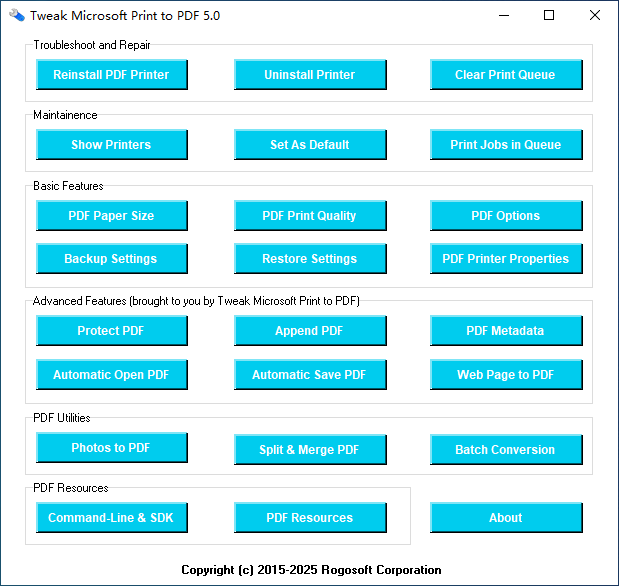
In case you need to rebuild corrupted or missing
Microsoft Print to PDF printer, automatically open and
view PDF document in any PDF reader after it is
created, protect your PDF files with password, apply
PDF paper size and PDF file size customizations, as
well as convert other file types to PDF in batch, this
tweak utility makes all these possible with the utmost
ease. It can help you adjust the settings of the
printer, tinker with the PDF options or change the
printer preferences.
The utility is able to adjust several PDF look and
feel settings on PDF startup, remove sensitive data in
PDF document, manage PDF permission options, backup
and restore the printer settings, and it gives you the
possibility to view and modify how PDF files are
created. Features like Automatic Save that works
silently bypassing the Sava Output as PDF box, or the
automatic email PDF document with any email client can
be activated with one click.
There are some functions pertaining to the behavior of
the printer that can be enabled, like prompt,
overwrite, skip, append, when the destination PDF file
exists, output PDF files to a folder or a file, and
pass created PDF files to another program for
processing.
Those interested in customizing in depth their
Microsoft Print to PDF printer should definitely try
this application. Very easy to use, even by novices,
this tweaker will surely help anyone who wants to
enhance the capabilities of Microsoft Print to PDF in
a straightforward way.
customizing Microsoft Print to PDF printer to make it
more appropriate to your needs are tasks that will no
longer require extensive computer knowledge. This
handy tweak utility is designed to change the behavior
of Microsoft Print to PDF printer and empower the
printer with many advanced features comparable to
Adobe Acrobat. The user only has to decide which areas
of Microsoft Print to PDF should be improved and then
simply follow the recommended settings.
In case you need to rebuild corrupted or missing
Microsoft Print to PDF printer, automatically open and
view PDF document in any PDF reader after it is
created, protect your PDF files with password, apply
PDF paper size and PDF file size customizations, as
well as convert other file types to PDF in batch, this
tweak utility makes all these possible with the utmost
ease. It can help you adjust the settings of the
printer, tinker with the PDF options or change the
printer preferences.
The utility is able to adjust several PDF look and
feel settings on PDF startup, remove sensitive data in
PDF document, manage PDF permission options, backup
and restore the printer settings, and it gives you the
possibility to view and modify how PDF files are
created. Features like Automatic Save that works
silently bypassing the Sava Output as PDF box, or the
automatic email PDF document with any email client can
be activated with one click.
There are some functions pertaining to the behavior of
the printer that can be enabled, like prompt,
overwrite, skip, append, when the destination PDF file
exists, output PDF files to a folder or a file, and
pass created PDF files to another program for
processing.
Those interested in customizing in depth their
Microsoft Print to PDF printer should definitely try
this application. Very easy to use, even by novices,
this tweaker will surely help anyone who wants to
enhance the capabilities of Microsoft Print to PDF in
a straightforward way.
Program details
Publisher
Sten GullanderE-mail
Contact the publisherPlatforms
Windows 10File size
4068 KBFile date
6/24/2020License
SharewareExpires after
15 daysInstallation
Install & UninstallRecord updated
7/11/2020