
USB Low-Level Format
Version 5.01
Freeware
Free
2 downloads
The capacity of USB flash drives and hard drives keeps growing every year. Have you ever tried formatting a high-capacity USB flash drive, a hard disk, or a SSD (Solid State Drive) in FAT32 file system on Microsoft Windows? The built-in Format program does not provide FAT32 as one of the available options for your drive. Microsoft Windows suggests you to format a disk/drive larger than 32GB in either NTFS or ExFAT file system. The largest FAT32 volume that Windows can create is 32GB. However, modern versions of Windows can read large FAT32 drives fine.
There are other methods to make larger volumes, since the theoretical max is 2TB for FAT32, but you would find support for large FAT32 volumes to be sparse. In most cases, an error message saying The Volume Is Too Big for FAT32 pops up before the Format operation completes.
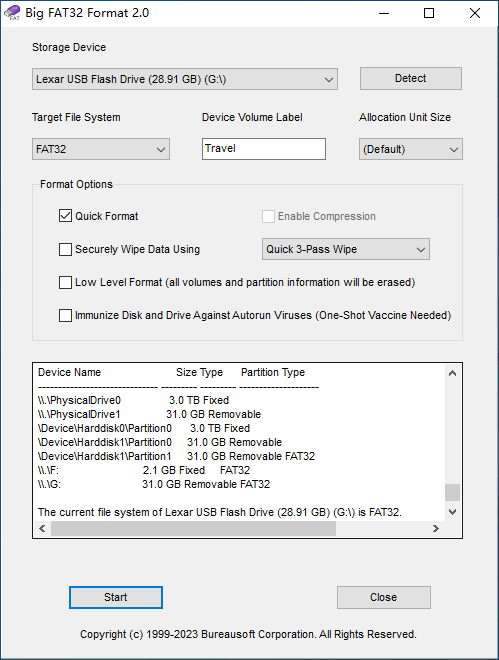
Big FAT32 Format software is an innovative formatter to format high-capacity drives in FAT32 file system. As its name indicates, the software is capable of formatting both USB drives and hard drives for up to 2TB. The formatter is monumentally fast, so you don't need to worry about whether it freezes through the process.
The software allows quick format, which completes disk drive format in a split second. If you would like to erase all the data on the drive, simply choose slow format and optionally securely wipe data using an algorithm of industrial strength. For high-capacity drive, the software features an option namely low level format that thoroughly erases all volumes and partition table information. An interesting feature in the software is vaccination, which immunize disk drives against all types of Autorun viruses. Only one-shot vaccine is needed after the format operation. Users can easily adjust the sector size to achieve best compatibility with electronic devices, such as a smart TV or a car stereo.
In addition to FAT32, Big FAT32 Format formats any hard disk, SSD, and USB drive in NTFS and ExFAT file systems as well.
There are other methods to make larger volumes, since the theoretical max is 2TB for FAT32, but you would find support for large FAT32 volumes to be sparse. In most cases, an error message saying The Volume Is Too Big for FAT32 pops up before the Format operation completes.
Big FAT32 Format software is an innovative formatter to format high-capacity drives in FAT32 file system. As its name indicates, the software is capable of formatting both USB drives and hard drives for up to 2TB. The formatter is monumentally fast, so you don't need to worry about whether it freezes through the process.
The software allows quick format, which completes disk drive format in a split second. If you would like to erase all the data on the drive, simply choose slow format and optionally securely wipe data using an algorithm of industrial strength. For high-capacity drive, the software features an option namely low level format that thoroughly erases all volumes and partition table information. An interesting feature in the software is vaccination, which immunize disk drives against all types of Autorun viruses. Only one-shot vaccine is needed after the format operation. Users can easily adjust the sector size to achieve best compatibility with electronic devices, such as a smart TV or a car stereo.
In addition to FAT32, Big FAT32 Format formats any hard disk, SSD, and USB drive in NTFS and ExFAT file systems as well.
Program details
Publisher
BureauSoft CorporationE-mail
Contact the publisherPlatforms
Win7 x32,Win7 x64,Win8 x32,Win8 x64,Windows 10,WinServer,Windows XP,WinVista x64File size
1992707 KBFile date
7/9/2021License
FreewareInstallation
Install & UninstallRecord updated
12/19/2021


