
FrontFace Lockdown Tool
Version 5.0.2
Freeware
Free
0 downloads
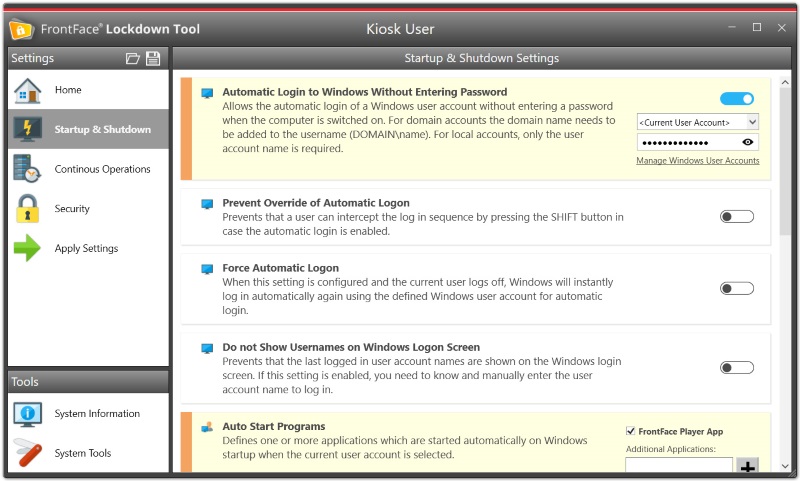
Protect and lock down any Windows PC for use as public kiosk terminal or for digital signage applications! Simply protect any Windows PC with a single click and/or make it ready for an unattended, continuous 24/7 use. The FrontFace Lockdown Tool e.g. allows you to disable certain keyboard keys such as the Windows key or typical shortcuts like Ctrl+Alt+Del. It also helps you to configure a restricted user account that automatically logs on at boot time without entering a password or controls the automatic start of a predefined application.
The FrontFace Lockdown Tool helps you to set up a kiosk mode which protects public-facing PCs against unauthorized access and vandalism. It also helps you to prepare Windows PCs for 24/7 unattended continous operation by providing a single point of configuration. You do not have to dive into the complex settings of the Windows Registry and other system features. Finally, you can easily deploy your configuration profiles created with the FrontFace Lockdown Tool to multiple PCs with a single click. This is perfect for a larger deloyment of similar terminals.
The FrontFace Lockdown Tool helps you to set up a kiosk mode which protects public-facing PCs against unauthorized access and vandalism. It also helps you to prepare Windows PCs for 24/7 unattended continous operation by providing a single point of configuration. You do not have to dive into the complex settings of the Windows Registry and other system features. Finally, you can easily deploy your configuration profiles created with the FrontFace Lockdown Tool to multiple PCs with a single click. This is perfect for a larger deloyment of similar terminals.
Program details
Publisher
mirabyte GmbH & Co. KGE-mail
Contact the publisherPlatforms
Win7 x32,Win7 x64,Win8 x32,Win8 x64,Windows 10,WinServer,Windows XP,Windows 2000,Windows NT 4.xFile size
15331 KBFile date
12/15/2021License
FreewareInstallation
No InstallRecord updated
1/19/2022