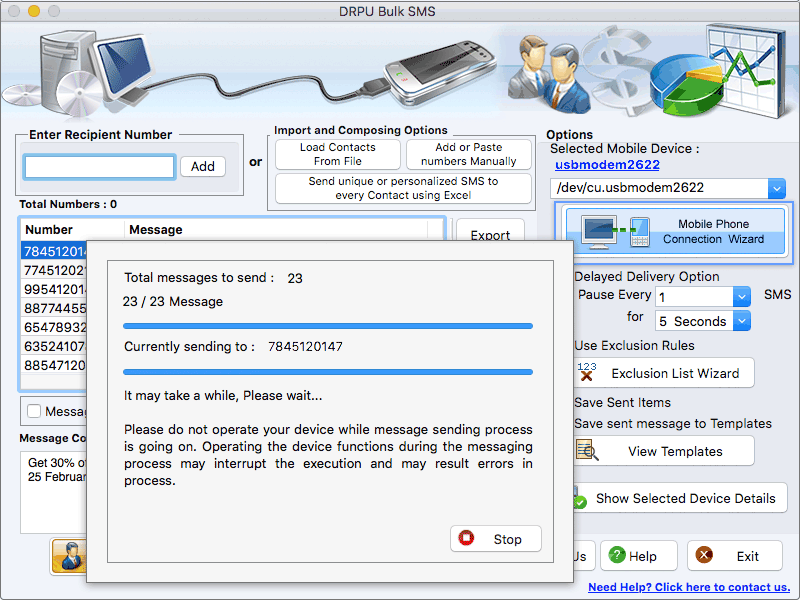

Apple MacOS Text Messaging App
Version 9.3.2.3
Shareware
$45.00
0 downloads
Using Mac Software messages can be scheduled to be sent at specific times or days and bulk messages can be sent on national and international mobile networks. Steps to deliver Text messages from MacOS machine: Step 1: Add the contact numbers in the recipient number list by following ways- 1) Write contact number in recipient number box and added in the list. 2) Import the contact numbers along with the messages by various sources like txt file, excel file or add manually. Step 2: Update message of the contact numbers through two ways- 1) If user wants to update a unique message to every contact number, then select the Update Selected Messages option. 2) If user wants to update the same message to multiple contact numbers, then write a new SMS in message composer box and select Apply this message to list items option. Step 3: Use Delayed Delivery option to pause several text messages for a particular time so that the load of bulk SMS transmission can be controlled. Step 4: Prevent the blacklisted contacts from receiving messages, by excluding them with the help of Exclusion List Wizard option. Step 5: If user wants to forward a message directly to other contacts without any changes, then save that particular message as a template by clicking on Save sent message to Templates option. Step 6: Skip the entries of duplicate contacts while sending group messages, with the help of Skip Duplicate Numbers option. Step 7: Use Unicode characters option to write the bulk SMS in any text format. Step 8: Click on send option for the message transmission process. Highlighted Features: *Skip Duplicate Numbers option helps the user to skip repeated contact number entries while sending messages. *Software allows the user to export the text messages in html, txt or excel file formats. *Software allows the user to save the sent text SMS as a template for further use. *Maintain the list of contacts during message sending process by using Exclusion List Wizard option.
Program details
Publisher
sendsmsmessages.netE-mail
Contact the publisherPlatforms
Mac OS X,Mac OtherFile size
8530 KBFile date
2/11/2022License
SharewareExpires on
2/11/2023Expires after
365 daysInstallation
Install & UninstallRecord updated
2/11/2022