
MacOS Multi Device Bulk SMS Application
Version 9.3.2.3
Shareware
$49.00
2 downloads
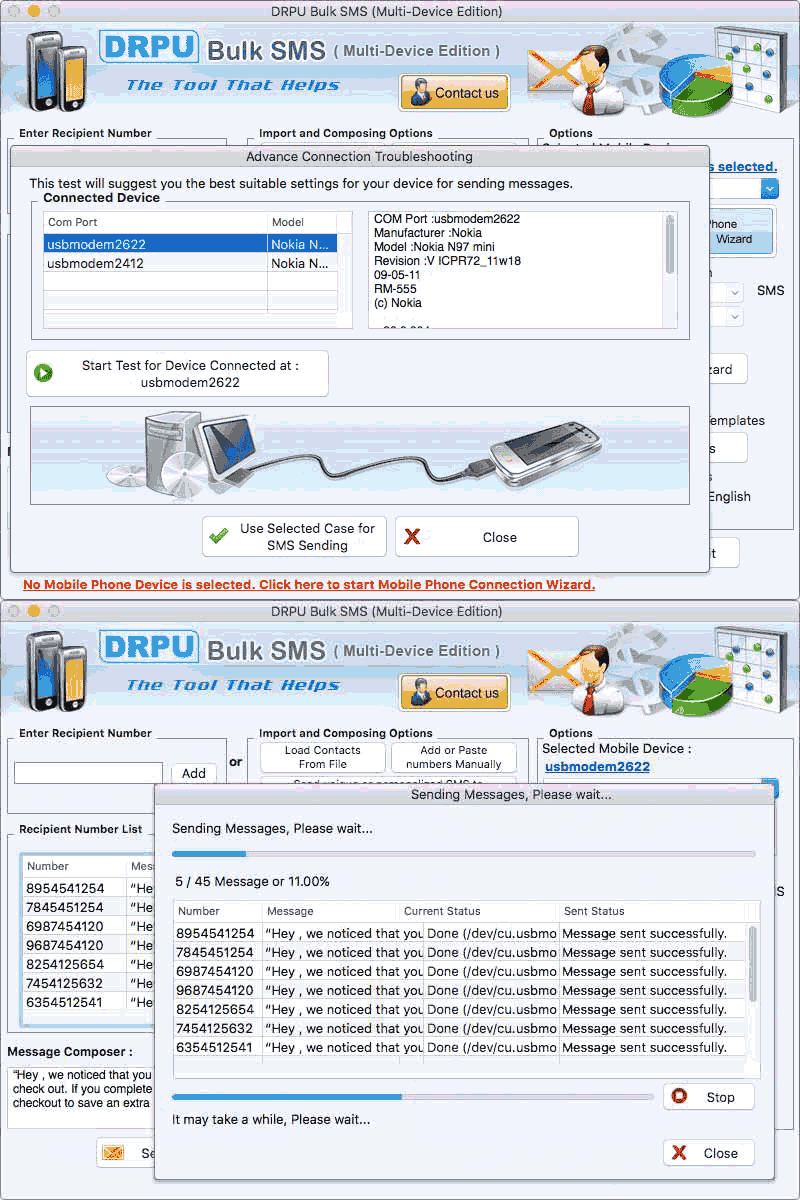
Apple Mac Bulk SMS Messaging Tool broadcasts unlimited text SMS by using GSM technology based mobile phones connected with Mac OS X installed PC. User can send text messages over national and international mobile networks in the form of standard SMS or notifications. There are following steps that help the user to send bulk text messages- Step 1: Click on Mobile Phone Connection Wizard option and select the mobile devices from which you want to send text messages. Step 2: Add the contact numbers along with the text messages in the recipient number list through two ways- 1) Enter the contact number in recipient number box and then add it in the list. 2) Import the recipient numbers along the messages by loading contacts from file, using excel file or add and paste numbers manually. Step 3: Update the text messages of every contact number in recipient number list through two ways- 1) Choose update selected messages option, write a unique message for every selected contact number and then apply in it. 2) Write a new standard message or notification in message composer box, click on apply this message to list items option and then apply it to all list items, selected list items or blank list items. Step 4: Avoid duplicate number entries automatically during SMS messaging by enabling the Skip Duplicate Numbers option. Step 5: Send the messages in any text format by enabling the Message contains Unicode Characters option. Step 6: Manage the load of bulk SMS broadcasting by clicking on Delayed Delivery Option in which you can pause some text messages for a specific time limit. Step 7: Choose Exclusion List Wizard option to exclude some contact numbers time to time during message sending process. Step 8: Save the sent text messages to templates so that, it can be directly forwarded to other cell phone users without any change. Step 9: Click on send option to deliver text SMS and after that, select sent items option to see the message details.
Program details
Publisher
sendsmsmessages.netE-mail
Contact the publisherPlatforms
Mac OS X,Mac OtherFile size
5026 KBFile date
2/11/2022License
SharewareExpires on
2/11/2023Expires after
365 daysInstallation
Install & UninstallRecord updated
2/15/2022