
Volume Wheel
Version 1.0
Freeware
Free
1 downloads
Control the volume with your mouse wheel with many options.
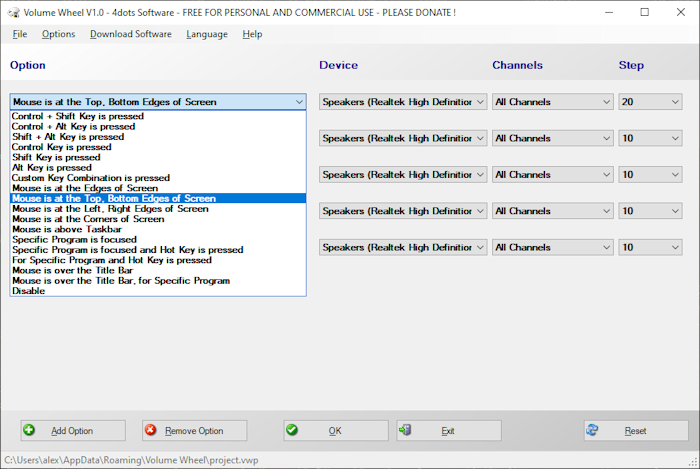
Control the volume with the mouse wheel when :
Control + Shift Key is pressed.
Control + Alt Key is pressed.
Shift + Alt Key is pressed.
Control Key is pressed.
Shift Key is pressed.
Alt Key is pressed.
Custom Key Combination is pressed.
Mouse is at the Edges of Screen.
Mouse is at the Top, Bottom Edges of Screen.
Mouse is at the Left, Right Edges of Screen.
Mouse is at the Corners of Screen.
Mouse is above Taskbar.
Specific Program is focused.
Specific Program is focused and Hot Key is pressed.
For Specific Program and Hot Key is pressed.
Mouse is over the Title Bar.
Mouse is over the Title Bar, for Specific Program.
Control the volume with the mouse wheel when :
Control + Shift Key is pressed.
Control + Alt Key is pressed.
Shift + Alt Key is pressed.
Control Key is pressed.
Shift Key is pressed.
Alt Key is pressed.
Custom Key Combination is pressed.
Mouse is at the Edges of Screen.
Mouse is at the Top, Bottom Edges of Screen.
Mouse is at the Left, Right Edges of Screen.
Mouse is at the Corners of Screen.
Mouse is above Taskbar.
Specific Program is focused.
Specific Program is focused and Hot Key is pressed.
For Specific Program and Hot Key is pressed.
Mouse is over the Title Bar.
Mouse is over the Title Bar, for Specific Program.
Program details
Publisher
4dots SoftwareE-mail
Contact the publisherPlatforms
Win7 x32,Win7 x64,Win8 x32,Win8 x64,Windows 10,WinServer,Windows XP,Windows 2000,Windows NT 4.xFile size
763 KBFile date
1/10/2023License
FreewareInstallation
Install & UninstallRecord updated
4/6/2023