
UkeySoft USB Encryption
Version 6.2.0
Shareware
$29.95
0 downloads
Need a USB Encryption software to protect/encrypt/lock data on USB flash drives, virtual hard disk(VHD), memory card, removable drive on Windows? UkeySoft USB Encryption is designed to password protect USB flash drives, memory card, SD card, memory stick to prevent your data from leakage, only three simple steps to encrypt your USB flash drive with password to restrict unwanted and unauthorized access!
UkeySoft USB Encryption allows you to create a secure and a public area on the storage devices, whose sizes can be easily adjusted according to your own needs. The secure area can only be accessed by inputting a correct password, data on the protected area (Secure area) is encrypted by 256-bits AES on-the-fly encryption, while the public area do not require password access.
UkeySoft USB Encryption support password protect all kinds of removable storage drive like USB flash drives, Thumb Drives, Memory Sticks, Memory Cards, Pen Drives and Jump Drives. It can help you password lock photos, pictures, videos, information, files, folders and all kinds of documents on USB drive, making data on USB drives completely secured. It supports Windows 2000, 2003, XP, Vista, Windows 7/8/10 (both 32 and 64 bit).
Tutorial: Protect Data Stored on USB Flash Drives by UkeySoft USB Encryption
Step 1.Run the Program and Insert a USB Stick to PC Launch the Ukeysoft USB Encryption and insert the USB stick that you want to password protect into the USB port of your computer.
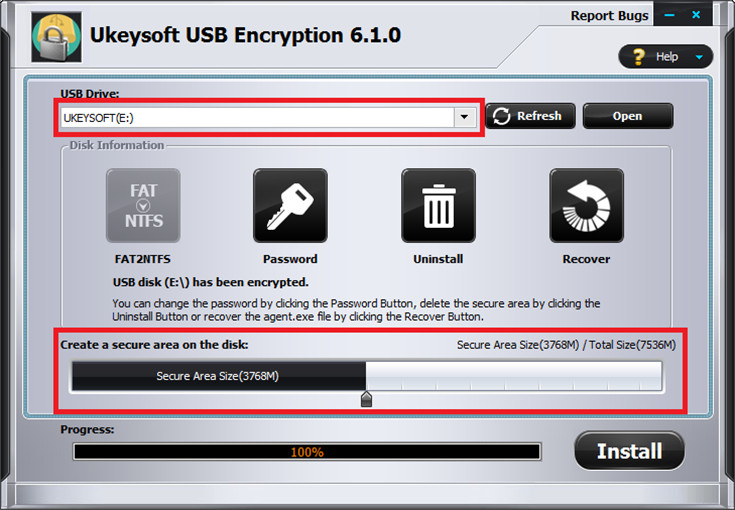
Step 2. Setting and Creating Secure Area Then, please choose the drive and set the size of secure area will be created, and click on the 'Install' button to start creating secure area.
Step 3. Set User Name and Password Set the user name and password of the secure area and click on the 'OK' button.
Well done, you have lock your USB drive with a password in 3 easy steps.
UkeySoft USB Encryption allows you to create a secure and a public area on the storage devices, whose sizes can be easily adjusted according to your own needs. The secure area can only be accessed by inputting a correct password, data on the protected area (Secure area) is encrypted by 256-bits AES on-the-fly encryption, while the public area do not require password access.
UkeySoft USB Encryption support password protect all kinds of removable storage drive like USB flash drives, Thumb Drives, Memory Sticks, Memory Cards, Pen Drives and Jump Drives. It can help you password lock photos, pictures, videos, information, files, folders and all kinds of documents on USB drive, making data on USB drives completely secured. It supports Windows 2000, 2003, XP, Vista, Windows 7/8/10 (both 32 and 64 bit).
Tutorial: Protect Data Stored on USB Flash Drives by UkeySoft USB Encryption
Step 1.Run the Program and Insert a USB Stick to PC Launch the Ukeysoft USB Encryption and insert the USB stick that you want to password protect into the USB port of your computer.
Step 2. Setting and Creating Secure Area Then, please choose the drive and set the size of secure area will be created, and click on the 'Install' button to start creating secure area.
Step 3. Set User Name and Password Set the user name and password of the secure area and click on the 'OK' button.
Well done, you have lock your USB drive with a password in 3 easy steps.
Program details
Publisher
ukeysoftE-mail
Contact the publisherPlatforms
Win7 x32,Win7 x64,Win8 x32,Win8 x64,Windows 10,WinServer,Windows XP,Windows 2000,WinVista x64,WinOtherFile size
3527680 KBFile date
1/1/2019License
SharewareExpires after
30 daysInstallation
Install & UninstallRecord updated
5/25/2023


