
AudioTime
Version 2.01
Shareware
$85.00
0 downloads
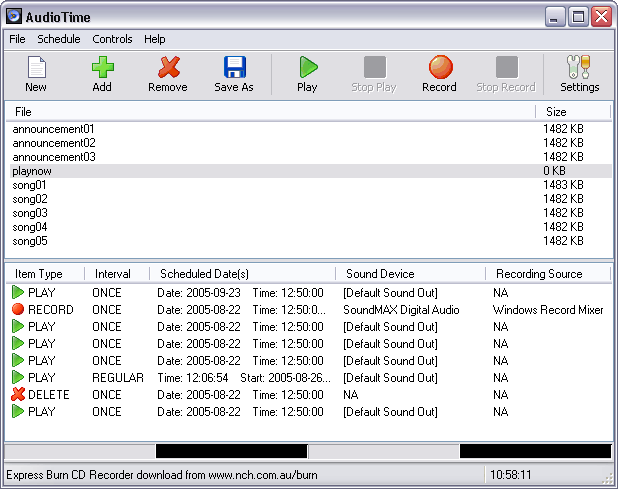
AudioTime lets you schedule your Windows computer to
record or replay audio at certain dates and times or
regular times on certain days of week. It can replay a
file while the file is being recorded (to delay the
recording) and record or replay multiple files at the
same time (if you have more than one sound card
installed).
Typically, AudioTime is used by Radio Stations to
record and replay network programs.
Features:
~ Record or replay audio automatically.
~ Schedule for either certain dates or time of day on
specified days of week between commence and expiration
dates.
~ Replay a file while it is still being recorded (eg.
to delay a network program) or to record a file while
it is still being played.
~ Select sample rate from 8kHz to 96kHz in either mono
or stereo.
~ Record multiple files at the same time or replay
multiple files at the same time by installing more
than one sound card.
record or replay audio at certain dates and times or
regular times on certain days of week. It can replay a
file while the file is being recorded (to delay the
recording) and record or replay multiple files at the
same time (if you have more than one sound card
installed).
Typically, AudioTime is used by Radio Stations to
record and replay network programs.
Features:
~ Record or replay audio automatically.
~ Schedule for either certain dates or time of day on
specified days of week between commence and expiration
dates.
~ Replay a file while it is still being recorded (eg.
to delay a network program) or to record a file while
it is still being played.
~ Select sample rate from 8kHz to 96kHz in either mono
or stereo.
~ Record multiple files at the same time or replay
multiple files at the same time by installing more
than one sound card.
Program details
Publisher
Peter LuptonE-mail
Contact the publisherPlatforms
Windows 95<br>Windows 98<br>Windows ME<br>Windows File size
255 KBFile date
2/1/2001License
SharewareInstallation
Install & UninstallRecord updated
8/23/2002


