
ACD mPower Tools
Version 1.0
Shareware
$49.95
0 downloads
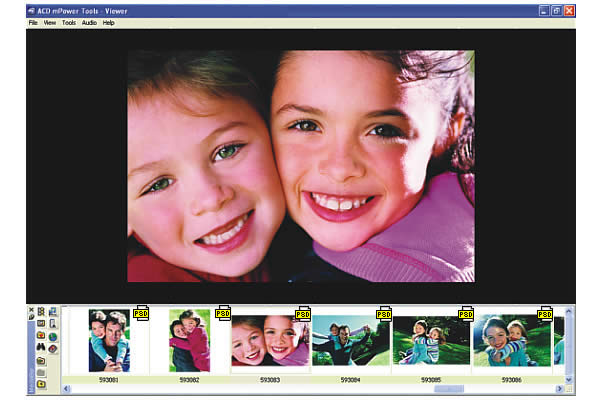
ACD mPower Tools extends the digital imaging features
of Windows. Save hours with at-a-glance metadata and
thumbnail views in Windows of Canon Raw, PSD, Kodak
Photo CD, AOL ART and over 40 more formats not
normally supported. Find and drag files into
Photoshop® fast. Get previews and batch editing with a
right-click. Photoshop users will love the media bar
for quickly finding pictures and dragging them into
Photoshop or other programs.
(428)
1000 - 2000 Characters:
ACD mPower Tools extends the digital imaging features
of Windows. Save hours with at-a-glance metadata and
thumbnail views in Windows of Canon Raw, PSD, Kodak
Photo CD, AOL ART and over 40 more formats not
normally supported. Find and drag files into
Photoshop® fast. Get previews and batch editing with a
right-click.
View more picture and graphic formats. See and sort on
additional metadata details. Preview video, audio and
images. Plus, batch edit, print, and share with a
right click. Find and grab media for other programs
fast.
Photoshop users will love the media bar for quickly
finding pictures and dragging them into Photoshop or
other programs.
Photographers will speed their workflow - viewing and
sorting by camera metadata in Windows and seeing
thumbnails for 50 professional formats including over
40 not normally supported in the operating system such
as Canon Raw, PSD and Kodak Picture CD.
Windows users will find it a snap to work with images,
sound and movie clips. With the handy right-click
menu, just click for quick previews of video, photos
and sound, for a fast graphics converter and to edit
batches of images and share them.
ACDSee users will love the right-click access to their
favorite ACDSee features and plug-ins in ACD mPower
Tools. Plus, ACD mPower Tools can share the ACDSee 5.0
image database for an integrated working environment.
ACD mPower Tools photo imaging software lets you think
less about what program to use and more about your
images, video and audio.
of Windows. Save hours with at-a-glance metadata and
thumbnail views in Windows of Canon Raw, PSD, Kodak
Photo CD, AOL ART and over 40 more formats not
normally supported. Find and drag files into
Photoshop® fast. Get previews and batch editing with a
right-click. Photoshop users will love the media bar
for quickly finding pictures and dragging them into
Photoshop or other programs.
(428)
1000 - 2000 Characters:
ACD mPower Tools extends the digital imaging features
of Windows. Save hours with at-a-glance metadata and
thumbnail views in Windows of Canon Raw, PSD, Kodak
Photo CD, AOL ART and over 40 more formats not
normally supported. Find and drag files into
Photoshop® fast. Get previews and batch editing with a
right-click.
View more picture and graphic formats. See and sort on
additional metadata details. Preview video, audio and
images. Plus, batch edit, print, and share with a
right click. Find and grab media for other programs
fast.
Photoshop users will love the media bar for quickly
finding pictures and dragging them into Photoshop or
other programs.
Photographers will speed their workflow - viewing and
sorting by camera metadata in Windows and seeing
thumbnails for 50 professional formats including over
40 not normally supported in the operating system such
as Canon Raw, PSD and Kodak Picture CD.
Windows users will find it a snap to work with images,
sound and movie clips. With the handy right-click
menu, just click for quick previews of video, photos
and sound, for a fast graphics converter and to edit
batches of images and share them.
ACDSee users will love the right-click access to their
favorite ACDSee features and plug-ins in ACD mPower
Tools. Plus, ACD mPower Tools can share the ACDSee 5.0
image database for an integrated working environment.
ACD mPower Tools photo imaging software lets you think
less about what program to use and more about your
images, video and audio.
Program details
Publisher
David HooperE-mail
Contact the publisherPlatforms
Windows 98<br>Windows ME<br>Windows NT 4.x<br>WindFile size
9923 KBFile date
11/7/2002License
SharewareExpires after
30 daysInstallation
Install & UninstallRecord updated
11/20/2002


