
NotesHolder Lite
Version 1.41
Freeware
$14.95
0 downloads
NotesHolder lets you quickly type in any piece of
information so that you can easily find it when you
need, read it or print it out for your convenience.
This is the most effective way to store all your notes
without cluttering up your desk with PostIt and sticky
notes.
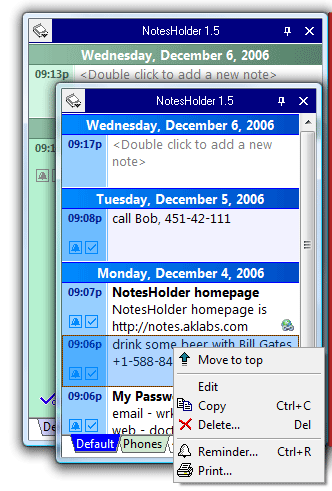
Unlike the other similar applications, NotesHolder is
very thrifty with your screen space. You can even turn
off NotesHolder icon in the system tray. But if you
move your mouse cursor to the edge of the screen, the
list of the notes sorted by the time of creation and
divided into categories will pop up. Click once to
create a new note or to edit an existing one. Click
once more to print the note.
NotesHolder Key Features:
1. Move the mouse to the edge of the screen to see
your notes. No clicks need!
2. Only one click to create a new note or to edit an
existing note!
information so that you can easily find it when you
need, read it or print it out for your convenience.
This is the most effective way to store all your notes
without cluttering up your desk with PostIt and sticky
notes.
Unlike the other similar applications, NotesHolder is
very thrifty with your screen space. You can even turn
off NotesHolder icon in the system tray. But if you
move your mouse cursor to the edge of the screen, the
list of the notes sorted by the time of creation and
divided into categories will pop up. Click once to
create a new note or to edit an existing one. Click
once more to print the note.
NotesHolder Key Features:
1. Move the mouse to the edge of the screen to see
your notes. No clicks need!
2. Only one click to create a new note or to edit an
existing note!
Program details
Publisher
Serg ApetE-mail
Contact the publisherHome page
http://notes.aklabs.com/Platforms
Windows 95<br>Windows 98<br>Windows ME<br>Windows File size
1157 KBFile date
1/10/2006License
FreewareExpires after
30 daysInstallation
Install & UninstallRecord updated
10/14/2006

