Add-in Express
Version 1.9
Commercial Demo
$57.75
0 downloads
Add-in Express is a tool for creating Microsoft Office
COM add-ins in Delphi. Using it you can develop a
single add-in that will run across the entire Office
suite of applications - MS Excel, Word, PowerPoint,
Outlook, Access, FrontPage and MS Project.
Add-in Express hides complexity of implementing the
IDTExtensibility2 interface that COM add-in
architecture is based on. And using Add-in Express,
add-in projects can be created by a couple of clicks.
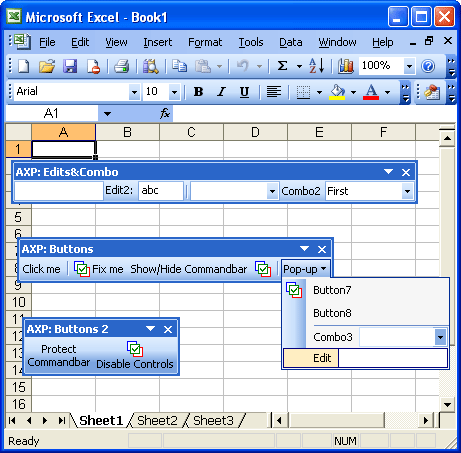
You create your own toolbars and place buttons, edit
boxes, combo boxes, and pop-ups onto them.
Add-in Express correctly handles hiding and deleting
controls, as well as moving them to other toolbars. It
also allows handling the controls' events. Use Delphi
forms, standard controls and components to develop a
COM add-in.
Quick Demo project includes a sample COM add-in for
all supported apps that creates a number of toolbars
and controls. You get the source code of the sample
add-in where you see the use of Office Add-in Express
classes as well as details of toolbar and control
creation.
COM add-ins in Delphi. Using it you can develop a
single add-in that will run across the entire Office
suite of applications - MS Excel, Word, PowerPoint,
Outlook, Access, FrontPage and MS Project.
Add-in Express hides complexity of implementing the
IDTExtensibility2 interface that COM add-in
architecture is based on. And using Add-in Express,
add-in projects can be created by a couple of clicks.
You create your own toolbars and place buttons, edit
boxes, combo boxes, and pop-ups onto them.
Add-in Express correctly handles hiding and deleting
controls, as well as moving them to other toolbars. It
also allows handling the controls' events. Use Delphi
forms, standard controls and components to develop a
COM add-in.
Quick Demo project includes a sample COM add-in for
all supported apps that creates a number of toolbars
and controls. You get the source code of the sample
add-in where you see the use of Office Add-in Express
classes as well as details of toolbar and control
creation.
Program details
Publisher
Afalina Co., Ltd. E-mail
Contact the publisherHome page
http://www.afalinasoft.com/Platforms
Windows 95<br>Windows 98<br>Windows ME<br>Windows File size
1086 KBFile date
1/26/2004License
Commercial DemoInstallation
Install & UninstallRecord updated
1/27/2004


