
Screenshot Utility
Version 1.0
Shareware
$17.00
0 downloads
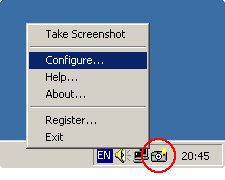
Screenshot Utility is a screen capture program. It
resides in the system tray, and when you press a
hotkey combination, it captures and saves a snapshot
of your screen as a JPEG, GIF, or BMP file.
You can define your own hotkeys, choose default path
for saving files, and select area to capture (entire
screen or active window). After the screenshot was
captured, Screenshot Utility alerts you with a message
or a sound. You can choose an option for automatic
saving (the program will automatically increment file
names of captured screenshots), or select the filename
manually after each capture.
Screenshot Utility is small, simple and very easy to
use. Just double-click the tray icon, set your
preferences, and start capturing screenshots!
resides in the system tray, and when you press a
hotkey combination, it captures and saves a snapshot
of your screen as a JPEG, GIF, or BMP file.
You can define your own hotkeys, choose default path
for saving files, and select area to capture (entire
screen or active window). After the screenshot was
captured, Screenshot Utility alerts you with a message
or a sound. You can choose an option for automatic
saving (the program will automatically increment file
names of captured screenshots), or select the filename
manually after each capture.
Screenshot Utility is small, simple and very easy to
use. Just double-click the tray icon, set your
preferences, and start capturing screenshots!
Program details
Publisher
Denis SkakunovE-mail
Contact the publisherHome page
http://www.screenshot-utility.com/Platforms
Windows 95<br>Windows 98<br>Windows ME<br>Windows File size
551 KBFile date
3/25/2001License
SharewareExpires after
30 daysExpiration info
The trial version is fully functional.Installation
Install & UninstallRecord updated
3/5/2003

