
AnyForm
Version 3.1
Shareware
$99.00
0 downloads
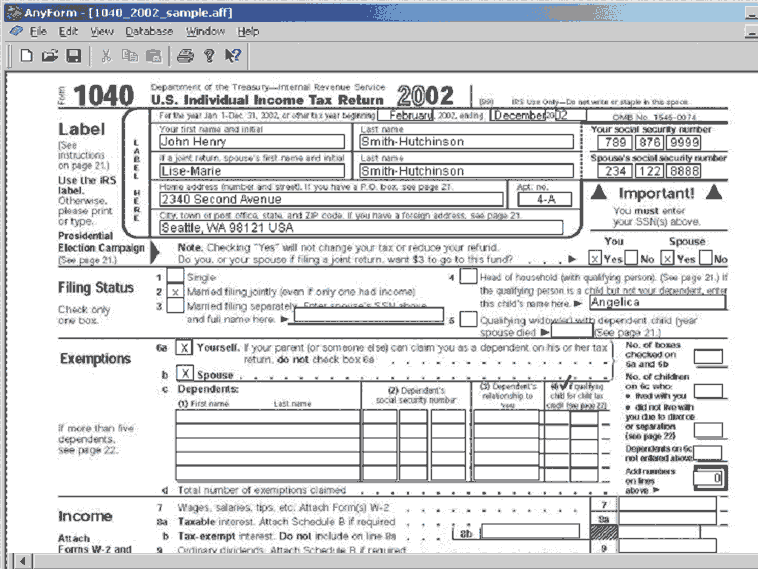
AnyForm form software enables you to fill out,
calculate and print out any given paper form exactly,
quickly and easily on your PC. The filling out of
these forms can be done by hand or by importing data
from an ODBC supported Database, like MS Excel, MS
Access, Sybase, Oracle, Informix etc.) The procedure
is as follows: 1. Scan a template or import a graphic
format (jpeg, gif, png, tga or bmp) from an original
paper form. 2. Set as many fillable fields on this
template as required. 3. Define these fields as
numerical, alphanumerical (text) or as date fields. 4.
Bind these fields by means of the macro-editor to
allow complex calculations or an automatic filling of
fields with the same text 4. Based on such a template
create a content file by filling out the predefined
fields either manually or by importing data from an
ODBC supported Database. 5. Print the content of these
fields exactly on to the corresponding fields of the
original paper form. 6. Alternatively, print the
content of these fields together with a copy of the
original form on to blank paper.
A fully operative, 30 days limited trial version and
countless AnyForm templates for immediate filling
(such as IRS-forms 1040, 1040NR, 1040NR-EZ, 5329 and
export forms, airway bills etc. can be downloaded for
free from www.smartform.com
calculate and print out any given paper form exactly,
quickly and easily on your PC. The filling out of
these forms can be done by hand or by importing data
from an ODBC supported Database, like MS Excel, MS
Access, Sybase, Oracle, Informix etc.) The procedure
is as follows: 1. Scan a template or import a graphic
format (jpeg, gif, png, tga or bmp) from an original
paper form. 2. Set as many fillable fields on this
template as required. 3. Define these fields as
numerical, alphanumerical (text) or as date fields. 4.
Bind these fields by means of the macro-editor to
allow complex calculations or an automatic filling of
fields with the same text 4. Based on such a template
create a content file by filling out the predefined
fields either manually or by importing data from an
ODBC supported Database. 5. Print the content of these
fields exactly on to the corresponding fields of the
original paper form. 6. Alternatively, print the
content of these fields together with a copy of the
original form on to blank paper.
A fully operative, 30 days limited trial version and
countless AnyForm templates for immediate filling
(such as IRS-forms 1040, 1040NR, 1040NR-EZ, 5329 and
export forms, airway bills etc. can be downloaded for
free from www.smartform.com
Program details
Publisher
Stefano CorvagliaE-mail
Contact the publisherPlatforms
Windows 95<br>Windows 98<br>Windows ME<br>Windows File size
2560 KBFile date
12/3/2002License
SharewareExpires after
30 daysInstallation
Install & UninstallRecord updated
5/23/2003