BlueSync
Version 2.0
Shareware
$19.95
0 downloads
BlueSync - back up multiple Palm cards including,
SD/MMC, Memory Sticks, etc. to your PC.
Problem: When you HotSync your Palm everything
backs up to a PC except for items stored on a card.
Solution: When you HotSync BlueSync will make
a back up of the card on the PC. BlueSync will also
synchronize items stored on both the Palm card and
the PC, allowing you to copy files into a PC
directory, HotSync, and automatically transfer the
files to a Palm card.
HOW IT WORKS:
SD/MMC, Memory Sticks, etc. to your PC.
Problem: When you HotSync your Palm everything
backs up to a PC except for items stored on a card.
Solution: When you HotSync BlueSync will make
a back up of the card on the PC. BlueSync will also
synchronize items stored on both the Palm card and
the PC, allowing you to copy files into a PC
directory, HotSync, and automatically transfer the
files to a Palm card.
- Simply transfer family photos to your Palm by
copying them to a directory on your PC. - Take documents to and from work with your Palm.
- Easily move MP3 files from your PC to your Sony
Clie by using the standard Windows copy command and
HotSyncing. - Keep an archive of the files stored on a card on
a PC.
HOW IT WORKS:
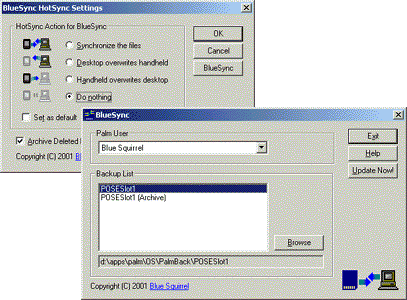
- BlueSync Desktop - Includes a list of the Palm
users, cards that it will perform back ups for, and
allows you to browse through stored items using
Windows Explorer. Avid Palm owners will use the
desktop application to go to the PC directory for
each
card. Add, edit, or remove files and HotSync to
transfer files from PC to Palm. - BlueSync Palm OS application - Allows you to
navigate, view, delete, and rename files located on a
card. To transfer files from Palm to PC use the
Copy... option from the menu in a Palm application
launcher. Doing so copies the Palm databases to
\PALM\Launcher. There are several other methods that
will work. - BlueSync Conduit - does the actual
synchronization
when a HotSync is done, and controls how a you will
synchronize files (synchronize, backup or restore).
When you HotSync BluePaste will synchronize both the
PC and Palm directories.
Program details
Publisher
Sheri PaddockE-mail
Contact the publisherPlatforms
Windows 95<br>Windows 98<br>Windows ME<br>Windows File size
2458 KBFile date
7/27/2004License
SharewareExpires after
15 daysInstallation
Install & UninstallRecord updated
12/21/2005