Clever Keyboard Indicator
Version 3.0
Commercial Demo
$20.00
5 downloads
Features:
* Display "Caps Lock", "Num Lock" and "Scroll Lock"
indicators in the windows system tray (next to the
Clock), allow the user to specify which indicators
should be shown/hidden, set the indicators order and
give ability to load custom icons for each indicator
* Play a sound when "Caps Lock", "Num Lock", "Scroll
Lock" status changed or "Ins" key pressed and allow
user to select custom sounds
* Play sound a notification when a custom combination
of keys are pressed
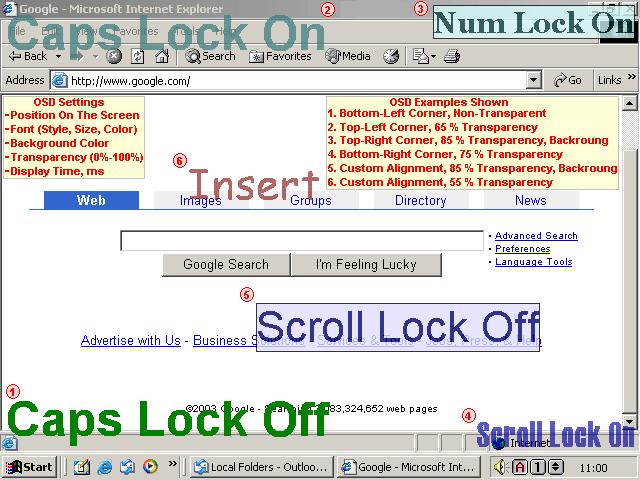
* Display OSD (on screen display) text when "Caps
Lock", "Num Lock", "Scroll Lock" or "Ins" pressed
* Display OSD text when a custom combination of keys
are pressed
* Select Font, Colors, Position, Transparency,
Display Time and many other options for OSD
* Turn on the "Num Lock" status every time when your
PC starts up
* Use PC beeper for all sound notifications (very
useful if you do not have a sound card installed)
* Suspend all sounds (silent mode)
and more...
* Display "Caps Lock", "Num Lock" and "Scroll Lock"
indicators in the windows system tray (next to the
Clock), allow the user to specify which indicators
should be shown/hidden, set the indicators order and
give ability to load custom icons for each indicator
* Play a sound when "Caps Lock", "Num Lock", "Scroll
Lock" status changed or "Ins" key pressed and allow
user to select custom sounds
* Play sound a notification when a custom combination
of keys are pressed
* Display OSD (on screen display) text when "Caps
Lock", "Num Lock", "Scroll Lock" or "Ins" pressed
* Display OSD text when a custom combination of keys
are pressed
* Select Font, Colors, Position, Transparency,
Display Time and many other options for OSD
* Turn on the "Num Lock" status every time when your
PC starts up
* Use PC beeper for all sound notifications (very
useful if you do not have a sound card installed)
* Suspend all sounds (silent mode)
and more...
Program details
Publisher
Clever ComponentsE-mail
Contact the publisherPlatforms
Windows 95<br>Windows 98<br>Windows ME<br>Windows File size
635 KBFile date
12/6/2003License
Commercial DemoInstallation
Install & UninstallRecord updated
8/9/2003


