
Computer Status Monitor
Version 3.1
Shareware
$19.00
0 downloads
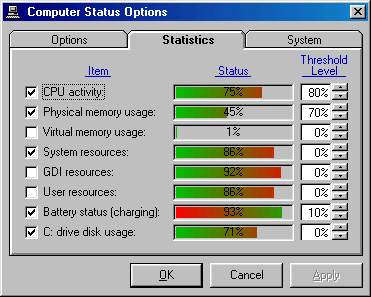
Have you ever been frustrated because you couldn’t
find just one program that would display the complete
status of your Windows computer? So you end up with
one program to show CPU usage, another program to show
memory usage, a third program to show disk usage,
etc. Purple Parrot Computer Status Monitor© displays
CPU usage, memory size and usage, resource usage
(Windows 95/98/ME only), disk space and usage,
processor type and speed, number of processors,
version and build number of Windows, and laptop
battery charge status and level. This information can
be permanently displayed in any location on your
screen (color-coded to indicate usage levels) or
minimized to the system tray. Best of all, you get to
select which information is displayed.. In addition,
the program will allow you to maintain your computer
clock's accuracy by synchronizing with any one of a
number of time servers located around the world.
find just one program that would display the complete
status of your Windows computer? So you end up with
one program to show CPU usage, another program to show
memory usage, a third program to show disk usage,
etc. Purple Parrot Computer Status Monitor© displays
CPU usage, memory size and usage, resource usage
(Windows 95/98/ME only), disk space and usage,
processor type and speed, number of processors,
version and build number of Windows, and laptop
battery charge status and level. This information can
be permanently displayed in any location on your
screen (color-coded to indicate usage levels) or
minimized to the system tray. Best of all, you get to
select which information is displayed.. In addition,
the program will allow you to maintain your computer
clock's accuracy by synchronizing with any one of a
number of time servers located around the world.
Program details
Publisher
Purple Parrot ProgramsE-mail
Contact the publisherPlatforms
Windows 95<br>Windows 98<br>Windows ME<br>Windows File size
2690 KBFile date
2/25/2006License
SharewareExpires after
30 daysInstallation
Install & UninstallRecord updated
2/25/2006


