
X-NetStat
Version 6.0.0.30
Shareware
$49.95
0 downloads
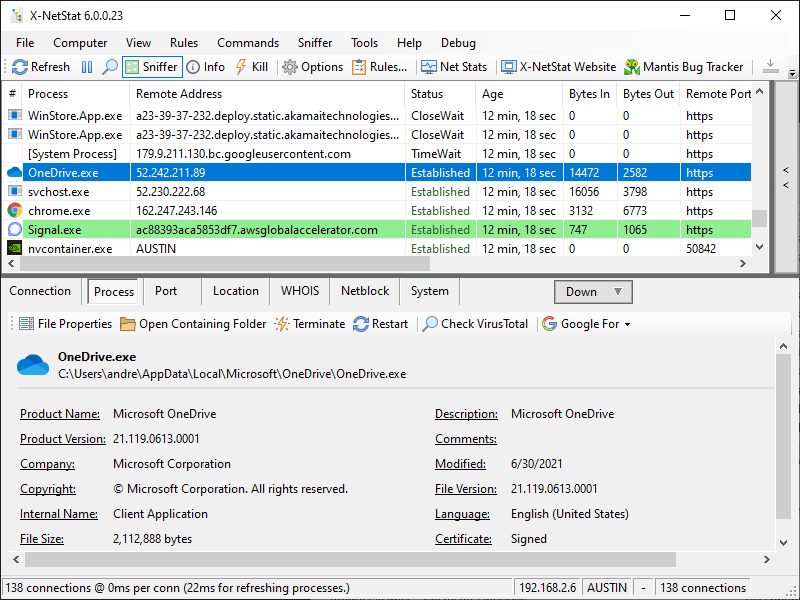
X-NetStat shows your current Internet and network connections in realtime. These connections are established each time you visit a web page, send an instant message, check your email, or anytime you do network activity that requires you to connect to another computer. They also appear when outside computers attempt to connect to your machine, authorized or not.
Information shown includes local and remote addresses, local and remote ports, the status, the age of the connection, how much bandwidth/traffic the connection is using, the program EXE behind it, geographical information, and more. It's kind of like Internet/network radar, and you can even kill unwanted connections.
There are additional features geared toward network administrations, like Windows Firewall integration, a Rules system to set up actions based on network conditions, line-speed and hop detection, a Network Statistics window displaying information on network interfaces and protocols, a Port Database, WHOIS client, local network scanner, and more.
Information shown includes local and remote addresses, local and remote ports, the status, the age of the connection, how much bandwidth/traffic the connection is using, the program EXE behind it, geographical information, and more. It's kind of like Internet/network radar, and you can even kill unwanted connections.
There are additional features geared toward network administrations, like Windows Firewall integration, a Rules system to set up actions based on network conditions, line-speed and hop detection, a Network Statistics window displaying information on network interfaces and protocols, a Port Database, WHOIS client, local network scanner, and more.
Program details
Publisher
Fresh SoftwareE-mail
Contact the publisherPlatforms
Win7 x32,Win7 x64,Win8 x32,Win8 x64,Windows 10,WinServer,Windows XP,Windows 2000,Windows NT 4.xFile size
77426 KBFile date
9/1/2021License
SharewareExpires after
60 daysInstallation
Install & UninstallRecord updated
10/13/2021