
Fast Folder Access
Version 2.0
Freeware
Free
5 downloads
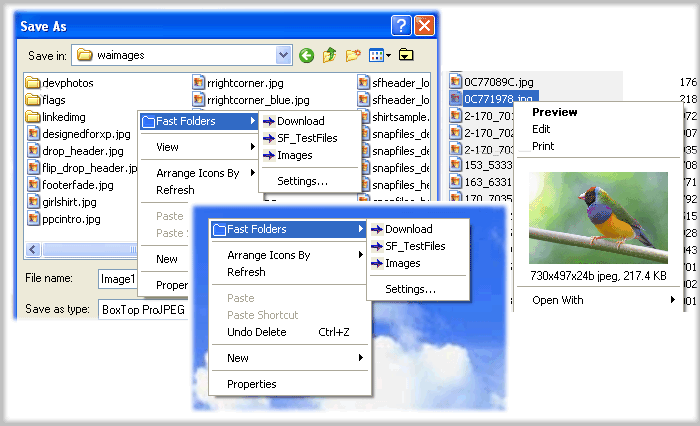
Fast Folder Access is a shell enhancement that gives
you quick jump to your favorite folders in Common
Open/Save dialogs, in Windows Explorer, the desktop
and the Start Button.You access the Fast Folder menu
by right-clicking anywhere in the
File,Directory,directory background (right pane) of
Windows Explorer, the "white area" of Common
Open/Save -dialogs,on the desktop and the Start button.
In the menu that pops up, there will be a new item
called "Fast Folders" with a list of folders that you
have added from within Fast Folder Access or from the
item "Add to Fast Folder" on the pop-up menu by right-
clicking the directory in Windows Explorer. Then you
can fast and easy browse these folders.
It's also an add-on for viewing images in Windows
Explorer that lets you right-click on an image file to
bring up a miniature image and image file information.
Also you can add any file as shortcut to Quick Launch
or create new folder.Having created the new folder,
you can add or drag the shortcuts to this new submenu.
Fast Folder Access runs automatically as part of the
Windows Explorer context menu, so you will never need
to start the program otherwise you want to edit the
list of folders.
you quick jump to your favorite folders in Common
Open/Save dialogs, in Windows Explorer, the desktop
and the Start Button.You access the Fast Folder menu
by right-clicking anywhere in the
File,Directory,directory background (right pane) of
Windows Explorer, the "white area" of Common
Open/Save -dialogs,on the desktop and the Start button.
In the menu that pops up, there will be a new item
called "Fast Folders" with a list of folders that you
have added from within Fast Folder Access or from the
item "Add to Fast Folder" on the pop-up menu by right-
clicking the directory in Windows Explorer. Then you
can fast and easy browse these folders.
It's also an add-on for viewing images in Windows
Explorer that lets you right-click on an image file to
bring up a miniature image and image file information.
Also you can add any file as shortcut to Quick Launch
or create new folder.Having created the new folder,
you can add or drag the shortcuts to this new submenu.
Fast Folder Access runs automatically as part of the
Windows Explorer context menu, so you will never need
to start the program otherwise you want to edit the
list of folders.
Program details
Publisher
Tom WangE-mail
Contact the publisherPlatforms
Windows 98<br>Windows XPFile size
1106 KBFile date
5/16/2014License
FreewareInstallation
Install & UninstallRecord updated
5/18/2014


