
Palm Dictate
Version 1.00
Shareware
$38.50
0 downloads
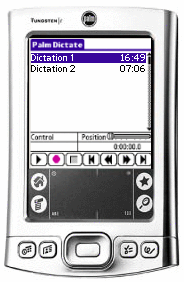
Palm Dictate lets you dictate with a hand held Palm
PC. You dictate directly on your Palm PC using the
buttons on the unit. When done, tap send and the
dictation will be compressed, encrypted and sent to
your typist by email automatically.
The software is designed to have all the features you
need as easy to use as possible and reliable for day-
to-day operation. If you install Palm Dictate you
will quickly find it will replace your old dictaphone
and, by using the internet to send dictations, will
improve the turnaround on typing.
Features
~ Record and playback dictation using the buttons on
the Palm PC. For ease of use, operation is designed
to closely mimic that of old style dictation
recorders. For example, you record by holding down
the record button on the side of your Palm PC.
Release the button to stop. To continue from where
you were press it down again. You can also playback,
rewind, insert or overwrite as required using the
keys on the front.
~ Editing, inserting and overwriting. You can select
between record overwrite, record insert and record
end modes.
~ Optional voice activated recording. When selected
Palm Dictate only records while you are speaking.
~ Automatic compression of audio files to reduce
upload times and storage requirements.
~ Encryption of recordings prior to transmission to
comply with patient or client confidentiality
requirements.
~ Sends recording in compressed wave (wav) or
dictation (dct) file formats.
PC. You dictate directly on your Palm PC using the
buttons on the unit. When done, tap send and the
dictation will be compressed, encrypted and sent to
your typist by email automatically.
The software is designed to have all the features you
need as easy to use as possible and reliable for day-
to-day operation. If you install Palm Dictate you
will quickly find it will replace your old dictaphone
and, by using the internet to send dictations, will
improve the turnaround on typing.
Features
~ Record and playback dictation using the buttons on
the Palm PC. For ease of use, operation is designed
to closely mimic that of old style dictation
recorders. For example, you record by holding down
the record button on the side of your Palm PC.
Release the button to stop. To continue from where
you were press it down again. You can also playback,
rewind, insert or overwrite as required using the
keys on the front.
~ Editing, inserting and overwriting. You can select
between record overwrite, record insert and record
end modes.
~ Optional voice activated recording. When selected
Palm Dictate only records while you are speaking.
~ Automatic compression of audio files to reduce
upload times and storage requirements.
~ Encryption of recordings prior to transmission to
comply with patient or client confidentiality
requirements.
~ Sends recording in compressed wave (wav) or
dictation (dct) file formats.
Program details
Publisher
NCH Swift SoundE-mail
Contact the publisherPlatforms
Windows 95<br>Windows 98<br>Windows ME<br>Windows File size
565 KBFile date
9/1/2004License
SharewareInstallation
Install & UninstallRecord updated
3/1/2005


