
Vemail Voice Email Software for Windows
Version 2.03
Shareware
$19.40
1 downloads
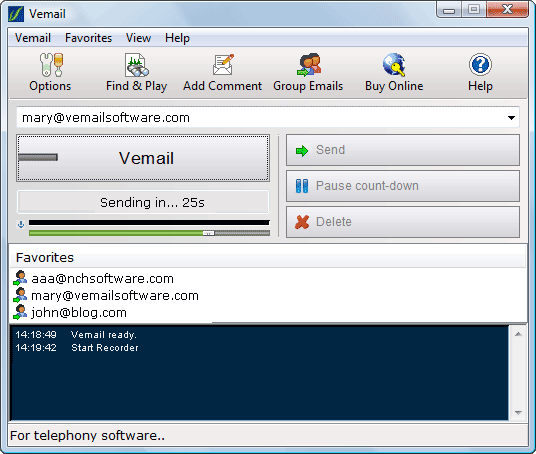
Vemail is software that lets you record and send voice
messages instead of text using ordinary email from you
PC or Pocket PC.
How Vemail Works: To send a voice message with Vemail
simply enter an email address and then press and hold
down F6 while speaking. When you have finished
recording, the message will be compressed and sent as
an email automatically. Almost anyone can receive and
listen to the vemail as it can be played with the
standard player installed in most PCs.
Benefits of Vemail: Vemails are much faster than
typing. They improve electronic communications by
letting people speak rather than type. You will also
find Vemails more personal because voice is much
easier and natural than typed text. The software is
very easy to use and in a short time you can be
quickly sending Vemails where in the past you would
have spent a long time typing.
messages instead of text using ordinary email from you
PC or Pocket PC.
How Vemail Works: To send a voice message with Vemail
simply enter an email address and then press and hold
down F6 while speaking. When you have finished
recording, the message will be compressed and sent as
an email automatically. Almost anyone can receive and
listen to the vemail as it can be played with the
standard player installed in most PCs.
Benefits of Vemail: Vemails are much faster than
typing. They improve electronic communications by
letting people speak rather than type. You will also
find Vemails more personal because voice is much
easier and natural than typed text. The software is
very easy to use and in a short time you can be
quickly sending Vemails where in the past you would
have spent a long time typing.
Program details
Publisher
NCH Swift SoundE-mail
Contact the publisherPlatforms
Windows 98<br>Windows ME<br>Windows NT 3.x<br>WindFile size
277 KBFile date
5/25/2007License
SharewareInstallation
Install & UninstallRecord updated
11/21/2007