
Micro Life
Version 1.0
Shareware
$9.95
0 downloads
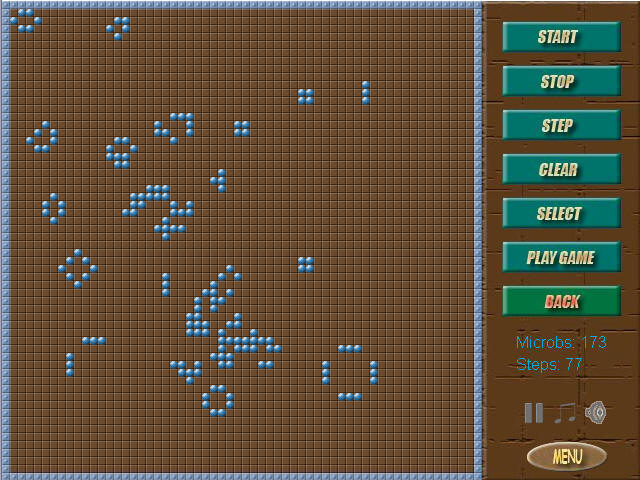
Game based on Conway's game - Life.
You create microbs population and look how it changes.
Game Rules:
Each cell has 8 near cells: 4 side and 4 corner.
1. If microb cell has less than 2 near microb cells -
it dies.
2. If microb cell has more than 3 near microb cells -
it dies.
3. If empty cell has exactly 3 near microb cells - it
produces new microb cell.
There are 3 basic formation types:
1. Stable - do not change.
2. Pulsing - repeat their formation periodically.
3. Moving - move to the specific direction.
You can choose some of them clicking on - Select.
To put cell - click Left Mouse Button.
To empty cell - click Right Mouse Button.
To start change formation click:
Start - for auto change
Stop - to stop auto change
Step - to change manually
Click Clear - to clear field or to end battle mode
You can also make real battle clicking - Play Game.
Click button Your Army - you can put your cells (blue)
Click button Enemy 1 - you can put enemy 1 cells (red)
Click button Enemy 2 - you can put enemy 2 cells
(green)
Click button Enemy 3 - you can put enemy 3 cells
(yellow)
Click Back - you return to the game menu.
Now Clicking - Start, Stop and Step - you can watch
micro battle.
To finish battle mode - click Clear.
Good Luck in creation your micro worlds !
You create microbs population and look how it changes.
Game Rules:
Each cell has 8 near cells: 4 side and 4 corner.
1. If microb cell has less than 2 near microb cells -
it dies.
2. If microb cell has more than 3 near microb cells -
it dies.
3. If empty cell has exactly 3 near microb cells - it
produces new microb cell.
There are 3 basic formation types:
1. Stable - do not change.
2. Pulsing - repeat their formation periodically.
3. Moving - move to the specific direction.
You can choose some of them clicking on - Select.
To put cell - click Left Mouse Button.
To empty cell - click Right Mouse Button.
To start change formation click:
Start - for auto change
Stop - to stop auto change
Step - to change manually
Click Clear - to clear field or to end battle mode
You can also make real battle clicking - Play Game.
Click button Your Army - you can put your cells (blue)
Click button Enemy 1 - you can put enemy 1 cells (red)
Click button Enemy 2 - you can put enemy 2 cells
(green)
Click button Enemy 3 - you can put enemy 3 cells
(yellow)
Click Back - you return to the game menu.
Now Clicking - Start, Stop and Step - you can watch
micro battle.
To finish battle mode - click Clear.
Good Luck in creation your micro worlds !
Program details
Publisher
Aleksei TaranovE-mail
Contact the publisherPlatforms
Windows 98<br>Windows ME<br>Windows NT 3.x<br>WindFile size
542 KBFile date
5/5/2005License
SharewareInstallation
Install & UninstallRecord updated
5/7/2005


