JiniBong
Version 2.723
Shareware
$20.00
0 downloads
Screen Pen, Transparent Note, Screen Capture -
JiniBong
You can see the date icon on the tray, after installed
JiniBong, And You can execute the each particular
function
Function #1. Screen Pen
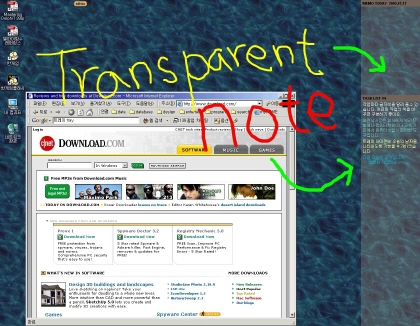
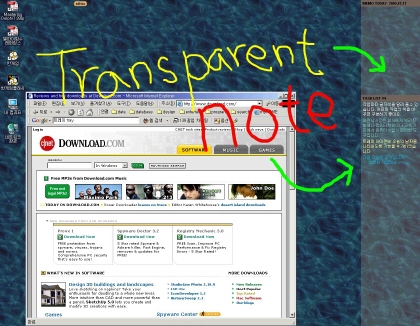
1. Once Press ALT+1, you can draw paint and write
text on screen, exit also ALT+1
2. You can choice Brush size and color
3. Before the Exit, You can save the screen as jpg file
Function #2. Note
1. JiniBong shows memos and tasks you edited on
desktop wall paper
2. This side bar is not window but image and
transparent mode
3. Press ALT+2, JiniBong shows Editor in that You can
edit memo and task
4. Again press ALT+2 for exit
Function #3. Screen Capture
1. After execute Screen Pen, you can capture screen,
in right-click and see the menu for capturring screen
Function #4. Alarm Message
1. Alarm Message is showed at the time when user want
to show it. you can register message in editor
License
This Program is unlimited but you have to purchase
licenses for lawful usage. We're confident you will
find JiniBong to be more than worth the small amount
we ask for licenses. Enjoy~!
To purchase Licenses You have to transfer the follow
amount to nominated bank account abroad
LICENSE PRICE : $20.00
COUNTRY : South Korea
BANK NAME : Hana-Bank
BANK ADDRESS : Hana-Bank, Yatap-dong, Bundang-gu,
Seongnam-si, Gyeonggi-do, Korea (463-070)
SWIFT CODE : HNBNKRSE
BANK ACCOUNT : 477-910042-98207
DEPOSITOR NAME : Kinam Park
DEPOSITOR PHONE : 82-10-4281-2911
DEPOSITOR ADDRESS : 5-5 Bunji, Sinhyeon-ri, Opo-eup,
Gwangju-si, Gyeonggi-do, Korea (464-895)
And please send a mail to follow e-mail address,
then we will send a license file to you
e-Mail : se7enup@hotmail.com
JiniBong
You can see the date icon on the tray, after installed
JiniBong, And You can execute the each particular
function
Function #1. Screen Pen
1. Once Press ALT+1, you can draw paint and write
text on screen, exit also ALT+1
2. You can choice Brush size and color
3. Before the Exit, You can save the screen as jpg file
Function #2. Note
1. JiniBong shows memos and tasks you edited on
desktop wall paper
2. This side bar is not window but image and
transparent mode
3. Press ALT+2, JiniBong shows Editor in that You can
edit memo and task
4. Again press ALT+2 for exit
Function #3. Screen Capture
1. After execute Screen Pen, you can capture screen,
in right-click and see the menu for capturring screen
Function #4. Alarm Message
1. Alarm Message is showed at the time when user want
to show it. you can register message in editor
License
This Program is unlimited but you have to purchase
licenses for lawful usage. We're confident you will
find JiniBong to be more than worth the small amount
we ask for licenses. Enjoy~!
To purchase Licenses You have to transfer the follow
amount to nominated bank account abroad
LICENSE PRICE : $20.00
COUNTRY : South Korea
BANK NAME : Hana-Bank
BANK ADDRESS : Hana-Bank, Yatap-dong, Bundang-gu,
Seongnam-si, Gyeonggi-do, Korea (463-070)
SWIFT CODE : HNBNKRSE
BANK ACCOUNT : 477-910042-98207
DEPOSITOR NAME : Kinam Park
DEPOSITOR PHONE : 82-10-4281-2911
DEPOSITOR ADDRESS : 5-5 Bunji, Sinhyeon-ri, Opo-eup,
Gwangju-si, Gyeonggi-do, Korea (464-895)
And please send a mail to follow e-mail address,
then we will send a license file to you
e-Mail : se7enup@hotmail.com
Program details
Publisher
kinam parkE-mail
Contact the publisherHome page
http://jinibong.gazio.com/Platforms
Windows 95<br>Windows 98<br>Windows ME<br>Windows File size
2947 KBFile date
7/23/2005License
SharewareInstallation
Install & UninstallRecord updated
8/3/2005


