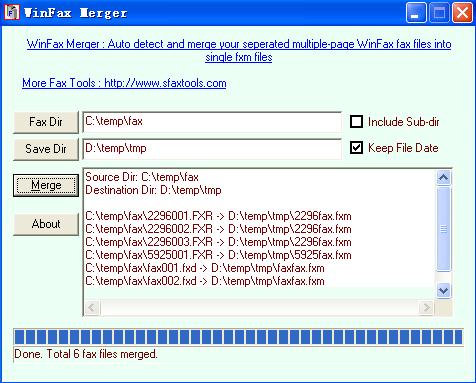

WinFax Merger
Version 2.3
Freeware
Free
0 downloads
WinFax Merger is a FREE WinFax multiple-page fax
files combiner/merger, able to combine/merge your
separate multiple-page WinFax fxd fxr fxs fax files
into single multiple-page fxm fax files in batches
automatically.
For example: you have 3-page winfax fax named
aaa001.fxr, aaa002.fxr, aaa003.fxr, you can merge
them into one aaafax.fxm file that includes all 3 fax
pages, with WinFax Merger.
WinFax usually save its multiple-page fax in several
separate files, one page a file, like aaa001.fxr,
aaa002.fxr, aaa003.fxr. If you open them by fax
viewer (like Smart FaxSee, FaxSee Pro), or convert
them to tiff, pdf or jpeg files by format conversion
tools (like Batch Fax2Tif, Batch Fax to PDF, Batch
Fax2JPEG), you may find that your multiple-page fax
are in separate multiple tiff (or pdf) files, not all
pages in one tiff (or pdf) file. Because the original
fax files are in sereval separate files, not all fax
pages in one file.
WinFax Merger is usefull for WinFax users. When you
convert your winfax to tiff (or pdf) files by format
conversion tools, you may find that your multiple-
page fax are in separate multiple tiff (or pdf)
files, not all pages in one tiff (or pdf) file.
If you do not want your converted multiple-page files
in separate multiple files, you can do it easily:
first merge your WinFax fax files with WinFax Merger,
then convert your merged fax files with your format
conversion tools.
Both GUI and command line modes are supported. Option
to keep original file date. Auto-merge is supported
by running periodically.
files combiner/merger, able to combine/merge your
separate multiple-page WinFax fxd fxr fxs fax files
into single multiple-page fxm fax files in batches
automatically.
For example: you have 3-page winfax fax named
aaa001.fxr, aaa002.fxr, aaa003.fxr, you can merge
them into one aaafax.fxm file that includes all 3 fax
pages, with WinFax Merger.
WinFax usually save its multiple-page fax in several
separate files, one page a file, like aaa001.fxr,
aaa002.fxr, aaa003.fxr. If you open them by fax
viewer (like Smart FaxSee, FaxSee Pro), or convert
them to tiff, pdf or jpeg files by format conversion
tools (like Batch Fax2Tif, Batch Fax to PDF, Batch
Fax2JPEG), you may find that your multiple-page fax
are in separate multiple tiff (or pdf) files, not all
pages in one tiff (or pdf) file. Because the original
fax files are in sereval separate files, not all fax
pages in one file.
WinFax Merger is usefull for WinFax users. When you
convert your winfax to tiff (or pdf) files by format
conversion tools, you may find that your multiple-
page fax are in separate multiple tiff (or pdf)
files, not all pages in one tiff (or pdf) file.
If you do not want your converted multiple-page files
in separate multiple files, you can do it easily:
first merge your WinFax fax files with WinFax Merger,
then convert your merged fax files with your format
conversion tools.
Both GUI and command line modes are supported. Option
to keep original file date. Auto-merge is supported
by running periodically.
Program details
Publisher
sfaxtools studioE-mail
Contact the publisherPlatforms
Windows 95<br>Windows 98<br>Windows ME<br>Windows File size
447 KBFile date
3/18/2009License
FreewareExpires after
1000000 daysExpiration info
no limitationInstallation
Install & UninstallRecord updated
4/15/2009


